SpringMVC-ContentNegotiation 内容协商
SpringMVC-ContentNegotiation 内容协商
官方文档
参考博客
Spring MVC内置支持的4种内容协商方式【享学Spring MVC】 - YourBatman - 博客园
Spring MVC内容协商实现原理及自定义配置【享学Spring MVC】 - YourBatman - 博客园
内容协商在视图View上的应用【享学Spring MVC】 - YourBatman - 博客园
什么是内容协商
一个 URL资源 服务端可以以多种形式(即 MIME(MediaType)媒体类型)进行响应,简单来说就是同一个控制器方法,根据客户端想要的类型返回不同媒体类型的数据。但对于一个具体的客户端或者某一个具体的请求(浏览器、APP、Excel 导出...)来说,它只需要一种。这样客户端和服务端就得有一种机制来保证服务器响应的信息的媒体类型就是客户端需要的媒体类型,这种机制就是内容协商机制。
HTTP 内容协商
方式
http 的内容协商方式大致有两种:
- 服务端将可用列表(自己能提供的 MIME 类型们)发给客户端,客户端选择后再告诉服务端。这样服务端再按照客户端告诉的 MIME 返给它。(缺点:多一次网络交互,而且使用对使用者要求高,所以此方式一般不用)
- (常用)客户端发请求时就指明需要的
MIME们(比如Http头部的:Accept),服务端根据客户端指定的要求返回合适的形式,并且在响应头中做出说明(如:Content-Type)。若客户端要求的 MIME 类型服务端提供不了,那就 406 错误吧。
相关请求头
Accept:告诉服务端客户端需要的 MIME(一般是多个,比如 text/plain,application/json 等。/表示可以是任何 MIME 资源)
Accept-Language:告诉服务端客户端需要的语言(在中国默认是中文嘛,但浏览器一般都可以选择 N 多种语言,但是是否支持要看服务器是否可以协商)
Accept-Charset:告诉服务端客户端需要的字符集
Accept-Encoding:告诉服务端客户端需要的压缩方式(gzip,deflate,br)
相关响应头
Content-Type:告诉客户端响应的媒体类型(如 application/json、text/html 等)
Content-Language:告诉客户端响应的语言
Content-Charset:告诉客户端响应的字符集
Content-Encoding:告诉客户端响应的压缩方式(gzip)
基础知识 - MimeType 和 MediaType
MimeType 主要由三部分组成,类型(type),子类型(subtype),参数(parameters),比如 application/xml;q=0.9,application 就是类型,xml 就是子类型,q=0.9 就是参数,参数可以有多个。
MediaType 继承 MimeType,在类中添加了各种常规的 MimeType,同时添加了质量参数 q(MimeType 的参数中的一个)的支持,同时还添加了两个比较器 SPECIFICITY_COMPARATOR 和 QUALITY_VALUE_COMPARATOR,后面都会提到。
MediaType.SPECIFICITY_COMPARATOR比较器和MediaType.QUALITY_VALUE_COMPARATOR比较器其实都对MediaType做了三方面的比较,
质量类型的质量值,也可以叫权重,比如
audio/*;q=0.3中0.3就是质量值,质量参数值越小的,在比较器中的值越大,越排在最后面,权重代表优先级,值越大越优先。质量类型表达式中是否包含通配符,即是否足够具体,越具体的在比较器中的值越大
质量类型表达式中包含的参数的个数,包含的参数个数越多,越具体,参数个数越少,越不具体的在比较器中的值越大
(按照升序排列)在比较器中的值越大,越排在输出结果的后面。
这两个比较器的区别主要在于这三个方面的比较顺序
MediaType.SPECIFICITY_COMPARATOR比较的顺序是2、1、3器和MediaType.QUALITY_VALUE_COMPARATOR比较器的比较顺序是1、2、3
SpringMVC 的四种内容协商方式
注意,一般控制器方法的返回值只有在配合@ResponseBody 注解的时候才会有内容协商,直接返回视图名表示直接返回网页,响应的消息体的格式就是确定的,就是 text/html。
HTTP头Accept- 扩展名
- 请求参数
- 固定类型(producers)
简单看一下例子
POM 文件中先不引入 jackson-databind 和 jackson-dataformat-xml,只保留 Spring 相关的包
JavaBean
@Data
@AllArgsConstructor
@NoArgsConstructor
@Component
public class User {

    @NotBlank
    private String name;

    @NotBlank
    private String gender;

    @NotBlank
    @Email
    private String email;

    @NotNull
    @Min(0)
    @Max(100)
    private Integer age;

}
控制器方法
@Controller
@RequestMapping("/ContentNegotiation")
public class ContentNegotiationController {


    @RequestMapping("/user")
    @ResponseBody
    public User getUser() {
        User user = new User("xiashuo", "female", "[email protected]", 20);
        return user;
    }

}
测试类
@SpringJUnitWebConfig(locations = "classpath:SpringMVC.xml")
class ContentNegotiationControllerTest {

    @Autowired
    ApplicationContext applicationContext;

    MockMvc mockMvc;

    @BeforeEach
    void setup(WebApplicationContext wac) {
        this.mockMvc = MockMvcBuilders.webAppContextSetup(wac).build();
    }


    @Test
    @SneakyThrows
    void getUser() {
        mockMvc.perform(get("/ContentNegotiation/user")).andDo(print());
    }
}
运行测试类,发现报错,其实报错的根本原因,我们通过浏览器访问可以得知,是无法找到 converter 转化控制器方法返回的 User 对象
org.springframework.http.converter.HttpMessageNotWritableException: No converter found for return value of type: class xyz.xiashuo.springmvccontentnegotiation.bean.User
    org.springframework.web.servlet.mvc.method.annotation.AbstractMessageConverterMethodProcessor.writeWithMessageConverters(AbstractMessageConverterMethodProcessor.java:220)
    org.springframework.web.servlet.mvc.method.annotation.RequestResponseBodyMethodProcessor.handleReturnValue(RequestResponseBodyMethodProcessor.java:181)
    org.springframework.web.method.support.HandlerMethodReturnValueHandlerComposite.handleReturnValue(HandlerMethodReturnValueHandlerComposite.java:78)
    org.springframework.web.servlet.mvc.method.annotation.ServletInvocableHandlerMethod.invokeAndHandle(ServletInvocableHandlerMethod.java:124)
    org.springframework.web.servlet.mvc.method.annotation.RequestMappingHandlerAdapter.invokeHandlerMethod(RequestMappingHandlerAdapter.java:893)
    org.springframework.web.servlet.mvc.method.annotation.RequestMappingHandlerAdapter.handleInternal(RequestMappingHandlerAdapter.java:807)
    org.springframework.web.servlet.mvc.method.AbstractHandlerMethodAdapter.handle(AbstractHandlerMethodAdapter.java:87)
    org.springframework.web.servlet.DispatcherServlet.doDispatch(DispatcherServlet.java:1061)
    org.springframework.web.servlet.DispatcherServlet.doService(DispatcherServlet.java:961)
    org.springframework.web.servlet.FrameworkServlet.processRequest(FrameworkServlet.java:1006)
    org.springframework.web.servlet.FrameworkServlet.doGet(FrameworkServlet.java:898)
    javax.servlet.http.HttpServlet.service(HttpServlet.java:626)
    org.springframework.web.servlet.FrameworkServlet.service(FrameworkServlet.java:883)
    javax.servlet.http.HttpServlet.service(HttpServlet.java:733)
    org.apache.tomcat.websocket.server.WsFilter.doFilter(WsFilter.java:52)
其实看返回类型会不会报错,得看有没有
HttpMessageConverter支持解析,HttpMessageConverter支持不支持解析,即 canWrite 方法,主要看两个因素,一个是返回值的类型,一个是目的 MediaType,如果没有HttpMessageConverter支持解析当前控制器方法的返回值,或者有HttpMessageConverter支持解析当前控制器方法的返回值,但是不支持将此类型的返回值转化为指定的 MediaType,最终都会报错。如果此时的控制器方法的返回值类型为 String 类型,不添加别的依赖也不会报错,这是因为 SpringMVC 初始化的时候会默认注入一个
StringHttpMessageConverter,支持 String 类型,所以默认情况下 String 类型的返回值就可以解析,具体请看本章后面的StringHttpMessageConverter小节。
这个时候,我们添加一个依赖
<dependency>
    <groupId>com.fasterxml.jackson.core</groupId>
    <artifactId>jackson-databind</artifactId>
    <version>2.13.3</version>
</dependency>
再次开始测试,发现响应的消息体的格式为 Content-Type:"application/json"
MockHttpServletRequest:
      HTTP Method = GET
      Request URI = /ContentNegotiation/user
       Parameters = {}
          Headers = []
             Body = <no character encoding set>
    Session Attrs = {}

Handler:
             Type = xyz.xiashuo.springmvccontentnegotiation.controller.ContentNegotiationController
           Method = xyz.xiashuo.springmvccontentnegotiation.controller.ContentNegotiationController#getUser()

Async:
    Async started = false
     Async result = null

Resolved Exception:
             Type = null

ModelAndView:
        View name = null
             View = null
            Model = null

FlashMap:
       Attributes = null

MockHttpServletResponse:
           Status = 200
    Error message = null
          Headers = [Content-Type:"application/json"]
     Content type = application/json
             Body = {"name":"xiashuo","gender":"female","email":"[email protected]","age":20}
    Forwarded URL = null
   Redirected URL = null
          Cookies = []
再添加一个依赖
<dependency>
    <groupId>com.fasterxml.jackson.dataformat</groupId>
    <artifactId>jackson-dataformat-xml</artifactId>
    <version>2.9.8</version>
</dependency>
再次开始测试,发现响应的消息体的格式为 Content-Type:"application/xml;charset=UTF-8"
MockHttpServletRequest:
      HTTP Method = GET
      Request URI = /ContentNegotiation/user
       Parameters = {}
          Headers = []
             Body = <no character encoding set>
    Session Attrs = {}

Handler:
             Type = xyz.xiashuo.springmvccontentnegotiation.controller.ContentNegotiationController
           Method = xyz.xiashuo.springmvccontentnegotiation.controller.ContentNegotiationController#getUser()

Async:
    Async started = false
     Async result = null

Resolved Exception:
             Type = null

ModelAndView:
        View name = null
             View = null
            Model = null

FlashMap:
       Attributes = null

MockHttpServletResponse:
           Status = 200
    Error message = null
          Headers = [Content-Type:"application/xml;charset=UTF-8"]
     Content type = application/xml;charset=UTF-8
             Body = <User><name>xiashuo</name><gender>female</gender><email>[email protected]</email><age>20</age></User>
    Forwarded URL = null
   Redirected URL = null
          Cookies = []
为什么?
简单分析 RequestResponseBodyMethodProcessor
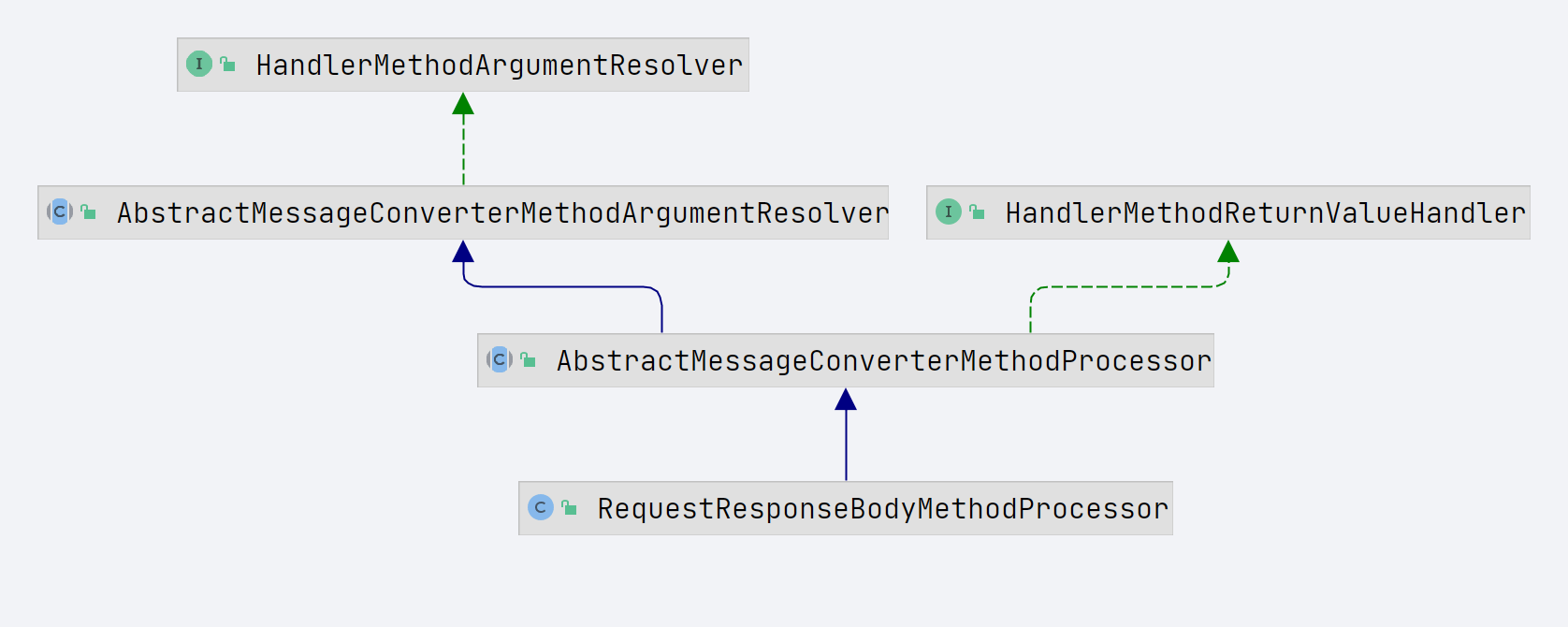
处理 @ResponseBody 的类是 RequestResponseBodyMethodProcessor。
关于为什么是
RequestResponseBodyMethodProcessor来处理@ResponseBody注解标记的返回值,请看《SpringMVC-RequestMappingHandlerAdapter 源码解析.md》下的返回值处理器小节
RequestResponseBodyMethodProcessor 的 handleReturnValue 方法调用其父类 AbstractMessageConverterMethodProcessor 的 writeWithMessageConverters 方法(参数多的那个),此方法的执行逻辑很简单。
-
判断当前响应的消息头中是否已经有 ContentType 消息头,如果已经设置了此消息头,则不需要进行内容协商,直接将此 MediaType 作为最终的 MediaType,即 selectedMediaType,然后直接响应消息体的写入即可(即直接跳到最后一步),如果没有设置 ContentType 消息头,则需要进行内容协商。
也就是说,如果我们在使用@ResponseBody 注解的时候不想进行内容协商,可以直接通过设置响应的 ContentType 消息头来跳过。
-
经过内容协商,根据请求分析客户端想要的 MediaType,内容协商的本质,是根据请求分析得出客户端想要的 MediaType
-
遍历所有
HttpMessageConverter,筛选支持处理当前控制器方法返回数据的类型的所有的HttpMessageConverter,然后获取这些HttpMessageConverter能够处理的所有的MediaType -
两者取交集,获取当前服务端能够提供的同时也满足客户端要求的 MediaType 列表
-
从满足要求的 MediaType 列表中取第一个 MediaType 作为最终的 MediaType
-
再次遍历所有的
HttpMessageConverter,依次判断当前 converter 能否将当前方法的返回值转化为指定的最终确定的 MediaType 即 selectedMediaType,排在前面的可以转化返回值的话,直接返回,后面的就不用再判断了,所以converter 的顺序很重要,这话都要说烂了。
@SuppressWarnings({"rawtypes", "unchecked"})
protected <T> void writeWithMessageConverters(@Nullable T value, MethodParameter returnType, ServletServerHttpRequest inputMessage, ServletServerHttpResponse outputMessage) throws IOException, HttpMediaTypeNotAcceptableException, HttpMessageNotWritableException {
    Object body;
    // 常规情况下,valueType 和 targetType 时同一个值(即 valueType == targetType 为true ),都是指控制器方法返回值的类型
    Class<?> valueType;
    Type targetType;


     ..........

    MediaType selectedMediaType = null;
    MediaType contentType = outputMessage.getHeaders().getContentType();
    boolean isContentTypePreset = contentType != null && contentType.isConcrete();
    if (isContentTypePreset) {
        if (logger.isDebugEnabled()) {
            logger.debug("Found 'Content-Type:" + contentType + "' in response");
        }
        // 如果响应的消息头中已经有了 ContentType 属性,则不需要进行内容协商,直接将此MediaType作为最终的MediaType进行响应即可
        // 也就是说,如果我们在使用 @ResponseBody注解的时候不想进行内容协商,可以直接通过设置响应的 ContentType 消息头来跳过
        selectedMediaType = contentType;
    }
    else {
        HttpServletRequest request = inputMessage.getServletRequest();
        // 经过内容协商,根据请求分析客户端想要的 MediaType
        List<MediaType> acceptableTypes = getAcceptableMediaTypes(request);
        // 遍历所有 HttpMessageConverter,筛选支持处理此类型数据的所有 HttpMessageConverter 能够处理的 MediaType
        // 注意,此时只考虑控制器方法的返回值类型,而没有考虑目标 MediaType,毕竟此时还没有确定目标 MediaType
        List<MediaType> producibleTypes = getProducibleMediaTypes(request, valueType, targetType);

        if (body != null && producibleTypes.isEmpty()) {
            throw new HttpMessageNotWritableException(
                    "No converter found for return value of type: " + valueType);
        }
        // 进行内容协商,获取当前控制器方法能够提供的同时也满足客户端要求的 MediaType 列表
        List<MediaType> mediaTypesToUse = new ArrayList<>();
        for (MediaType requestedType : acceptableTypes) {
            for (MediaType producibleType : producibleTypes) {
                if (requestedType.isCompatibleWith(producibleType)) {
                    mediaTypesToUse.add(getMostSpecificMediaType(requestedType, producibleType));
                }
            }
        }
        if (mediaTypesToUse.isEmpty()) {
            if (body != null) {
                throw new HttpMediaTypeNotAcceptableException(producibleTypes);
            }
            if (logger.isDebugEnabled()) {
                logger.debug("No match for " + acceptableTypes + ", supported: " + producibleTypes);
            }
            return;
        }

        // 把MediaType先根据质量参数再根据MediaType表达式的具体程度排序(带通配符的意味着不够具体)
        MediaType.sortBySpecificityAndQuality(mediaTypesToUse);

        // 从满足要求的 MediaType 列表中取第一个  MediaType 作为最终的  MediaType
        for (MediaType mediaType : mediaTypesToUse) {
            if (mediaType.isConcrete()) {
                selectedMediaType = mediaType;
                break;
            }
            else if (mediaType.isPresentIn(ALL_APPLICATION_MEDIA_TYPES)) {
                selectedMediaType = MediaType.APPLICATION_OCTET_STREAM;
                break;
            }
        }

        if (logger.isDebugEnabled()) {
            logger.debug("Using '" + selectedMediaType + "', given " +
                    acceptableTypes + " and supported " + producibleTypes);
        }
    }

    // 根据最终确定的 selectedMediaType 将结果转化为合适的  MediaType ,写入到响应的消息体中。
    if (selectedMediaType != null) {
        selectedMediaType = selectedMediaType.removeQualityValue();
        // 依然是依次遍历所有的 HttpMessageConverter ,依次判断当前converter能否将当前方法的返回值转化为指定的最终确定的 MediaType 即 selectedMediaType
        // 依然是按照顺序来遍历,排在前面的可以转化返回值的话,直接返回,后面的就不用再判断了,所以 converter 的顺序很重要,这话都要说烂了
        for (HttpMessageConverter<?> converter : this.messageConverters) {
            GenericHttpMessageConverter genericConverter = (converter instanceof GenericHttpMessageConverter ? (GenericHttpMessageConverter<?>) converter : null);
            // 调用 canWrite 方法,判断当前 converter 是否可以将当前值转化为指定的 MediaType,根据当前值的类型来判断。
            // 注意,跟前面调用 getProducibleMediaTypes 方法时不一样,此时,开始同时考虑控制器方法的返回值和目标MediaType
            // 支持处理某种类型的返回值的 HttpMessageConverter 可能有很多个,但是此时需要的是 能够将控制器方法返回值转化为特定 MediaType 的 HttpMessageConverter
            if (genericConverter != null ? ((GenericHttpMessageConverter) converter).canWrite(targetType, valueType, selectedMediaType) : converter.canWrite(valueType, selectedMediaType)) {
                // 可以,才进行下一步
                // 注意,这里还执行了一个通知方法: ResponseBodyAdvice 的 beforeBodyWrite,这是在构造 AbstractMessageConverterMethodProcessor 的时候传入的
                body = getAdvice().beforeBodyWrite(body, returnType, selectedMediaType, (Class<? extends HttpMessageConverter<?>>) converter.getClass(), inputMessage, outputMessage);
                if (body != null) {
                    Object theBody = body;
                    LogFormatUtils.traceDebug(logger, traceOn ->
                            "Writing [" + LogFormatUtils.formatValue(theBody, !traceOn) + "]");
                    addContentDispositionHeader(inputMessage, outputMessage);
                    if (genericConverter != null) {
                        // 在这里写入
                        genericConverter.write(body, targetType, selectedMediaType, outputMessage);
                    }
                    else {
                        // 在这里写入
                        ((HttpMessageConverter) converter).write(body, selectedMediaType, outputMessage);
                    }
                }
                else {
                    if (logger.isDebugEnabled()) {
                        logger.debug("Nothing to write: null body");
                    }
                }
                return;
            }
        }
    }

    .....
}
AbstractMessageConverterMethodProcessor 的 getAcceptableMediaTypes
获取客户端可接受的 MediaType,通过 ContentNegotiationManager 类型的变量的 contentNegotiationManager 的 resolveMediaTypes 解析
private List<MediaType> getAcceptableMediaTypes(HttpServletRequest request) throws HttpMediaTypeNotAcceptableException {
    return this.contentNegotiationManager.resolveMediaTypes(new ServletWebRequest(request));
}
ContentNegotiationManager我们后面会重点解析。
ContentNegotiationManager 的 resolveMediaTypes 方法如下,注意,众多解析策略中,哪个先解析成功,就用哪个解析出来的 mediaTypes,后面的不会再解析,所以解析策略的先后顺序很重要。
@Override
public List<MediaType> resolveMediaTypes(NativeWebRequest request) throws HttpMediaTypeNotAcceptableException {
    for (ContentNegotiationStrategy strategy : this.strategies) {
        List<MediaType> mediaTypes = strategy.resolveMediaTypes(request);
        if (mediaTypes.equals(MEDIA_TYPE_ALL_LIST)) {
            continue;
        }
        // 众多解析策略中,哪个先解析成功,就用哪个解析出来的mediaTypes
        return mediaTypes;
    }
    return MEDIA_TYPE_ALL_LIST;
}
ContentNegotiationStrategy 是一个函数式接口,只有一个方法,就是 resolveMediaTypes,作用是,解析出给定的请求的想要的媒体类型的列表, 返回的 List 首先会按照 specificity 参数(MediaType.SPECIFICITY_COMPARATOR 比较器)排序,其次按照 quality 参数(MediaType.QUALITY_VALUE_COMPARATOR 比较器)排序。
其实 ContentNegotiationStrategy 协商策略的实现类总共也就 4 种:FixedContentNegotiationStrategy、ServletPathExtensionContentNegotiationStrategy、ParameterContentNegotiationStrategy、HeaderContentNegotiationStrategy。
ContentNegotiationManager不算,它的作用是管理所有的协商策略
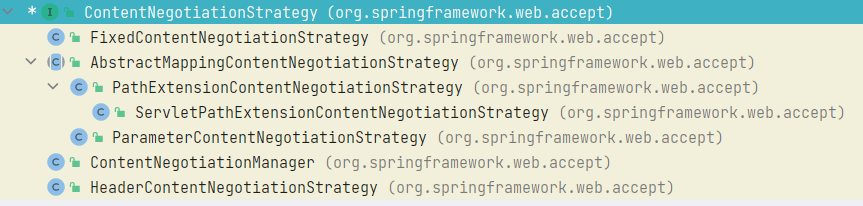
FixedContentNegotiationStrategy的作用是不管请求是什么,都固定的返回一个构造的时候传入的 MediaType 列表,大部分的场景下都用不上这个 Strategy
在默认情况下,ContentNegotiationManager 中默认注册的 strategies 中只包含 ServletPathExtensionContentNegotiationStrategy 和 HeaderContentNegotiationStrategy,而且 ServletPathExtensionContentNegotiationStrategy 排在前面,也就是说根据路径中的后缀进行内容协商的优先级是排在根据请求消息头中的 Accept 前面的。同时指定 URL 后缀和请求的消息头,只有 URL 后缀会生效,请求的消息头不会生效。
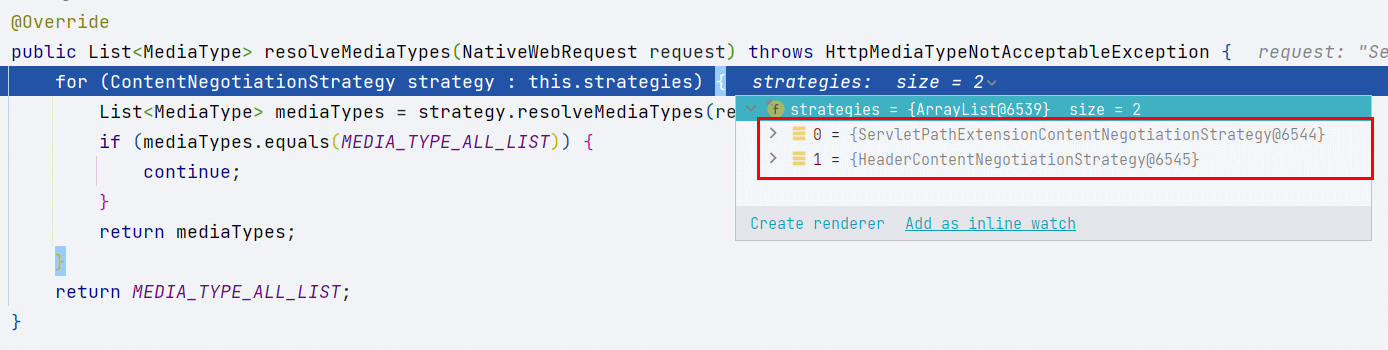
当 URL 中没有后缀的时候,经过 ServletPathExtensionContentNegotiationStrategy 的 resolveMediaTypes 得到的 mediaTypes,是 ContentNegotiationStrategy 的接口常量 MEDIA_TYPE_ALL_LIST(可通过 ContentNegotiationStrategy.MEDIA_TYPE_ALL_LIST 直接调用),或者当请求的消息头中没有 accept 的的时候,经过 HeaderContentNegotiationStrategy 的 resolveMediaTypes 得到的 mediaTypes 也是 ContentNegotiationStrategy.MEDIA_TYPE_ALL_LIST,ContentNegotiationStrategy.MEDIA_TYPE_ALL_LIST 只包含一个元素 MediaType.ALL,对应的 MediaType 是 */*。表示什么格式都可以,这个结果也可以理解为,当前策略没有生效,因为它没有解析出请求想要的是什么 MediaType。
AbstractMessageConverterMethodProcessor 的 getProducibleMediaTypes
如果控制器方法的@RequestMapping 注解配置了 producers,那就当作结果返回,否则就遍历构建 RequestResponseBodyMethodProcessor(继承自 AbstractMessageConverterMethodArgumentResolver)时传入的所有的 HttpMessageConverter,并将其支持的所有 MediaType 都添加到结果中
可以看到服务端最终能够提供哪些 MediaType,来源于当前存在的所有消息转换器 HttpMessageConverter 对类型的支持。
protected List<MediaType> getProducibleMediaTypes( HttpServletRequest request, Class<?> valueClass, @Nullable Type targetType) {

    // 如果 @RequestMapping注解配置了producers,那就当作结果返回,
    Set<MediaType> mediaTypes = (Set<MediaType>) request.getAttribute(HandlerMapping.PRODUCIBLE_MEDIA_TYPES_ATTRIBUTE);
    if (!CollectionUtils.isEmpty(mediaTypes)) {
        return new ArrayList<>(mediaTypes);
    }
    else if (!this.allSupportedMediaTypes.isEmpty()) {
        List<MediaType> result = new ArrayList<>();
        // 否则就遍历messageConverters列表中的所有的HttpMessageConverter,并将其支持的所有MediaType都添加到结果中
        for (HttpMessageConverter<?> converter : this.messageConverters) {
            // 要经过 HttpMessageConverter 的 canWrite 方法进行筛选,注意此时只考虑了控制器方法的返回值类型,而没有考虑 MediaType
            if (converter instanceof GenericHttpMessageConverter && targetType != null) {
                if (((GenericHttpMessageConverter<?>) converter).canWrite(targetType, valueClass, null)) {
                    result.addAll(converter.getSupportedMediaTypes());
                }
            }
            else if (converter.canWrite(valueClass, null)) {
                result.addAll(converter.getSupportedMediaTypes());
            }
        }
        return result;
    }
    else {
        return Collections.singletonList(MediaType.ALL);
    }
}
默认情况下,只有 7 个 HttpMessageConverter,其中,Jaxb2RootElementHttpMessageConverter 是用于处理 XML 格式的 mediaType 的。
默认的
HttpMessageConverter是在哪里添加的,请看后文的HttpMessageConverter小节
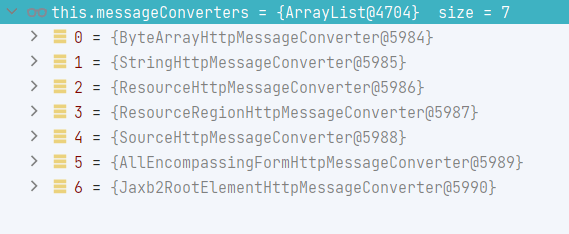
可以注意到其实原本就已经默认注册了一个 StringHttpMessageConverter。在 SpringMVC.xml 中,我们经常会默认再添加一个 StringHttpMessageConverter,这个 MessageConverter 会排在系统中所有的 MessageConverter 的第一个,用于处理处理响应中文内容乱码,同时在客户端没有指定响应中需要的 MediaType 时(例如 Accept=*/* 的时候),这个 MessageConverter 的第一个 supportedMediaTypes,会作为服务器响应的消息体的默认 MediaType。
此时,默认的内容协商格式为 json
<mvc:annotation-driven>
    <mvc:message-converters>
        <!-- 处理响应中文内容乱码 -->
        <bean class="org.springframework.http.converter.StringHttpMessageConverter">
            <property name="defaultCharset" value="UTF-8"/>
            <property name="supportedMediaTypes">
                <list>
                    <value>application/json</value>
                    <value>text/html</value>
                </list>
            </property>
        </bean>
    </mvc:message-converters>
</mvc:annotation-driven>
然后 HttpMessageConverter 就变成了 8 个,

注意,此时,在 @ResponseBody 修饰的控制器方法返回 JavaBean 类型的返回值,是无法正常解析的,既无法解析为 JSON 格式,也无法解析为 XML 格式。
为了添加对 JSON 格式和 XML 格式的支持,我们添加两个 POM 依赖
<!-- 消息转换组件 @RequestBody 必备-->
<!-- https://mvnrepository.com/artifact/com.fasterxml.jackson.core/jackson-databind -->
<dependency>
    <groupId>com.fasterxml.jackson.core</groupId>
    <artifactId>jackson-databind</artifactId>
    <version>2.13.3</version>
</dependency>
<!-- jackson默认只会支持的json。若要xml的支持,需要额外导入如下包 -->
<dependency>
    <groupId>com.fasterxml.jackson.dataformat</groupId>
    <artifactId>jackson-dataformat-xml</artifactId>
    <version>2.9.8</version>
</dependency>
Spring 在加载默认的 HttpMessageConverter 的时候,会根据类路径中是否存在 com.fasterxml.jackson.databind.ObjectMapper 决定是否添加 MappingJackson2HttpMessageConverter;根据类路径中是否存在 com.fasterxml.jackson.dataformat.xml.XmlMapper 决定是否添加 MappingJackson2XmlHttpMessageConverter。而 jackson-databind 刚好引入了 com.fasterxml.jackson.databind.ObjectMapper,jackson-dataformat-xml 刚好引入了 com.fasterxml.jackson.dataformat.xml.XmlMapper。
如果是 xml 配置的 SpringMVC,那么这个判断是在
AnnotationDrivenBeanDefinitionParser中的静态代码块中进行的,看《SpringMVC- 第二篇:控制器方法与请求映射》中的AnnotationDrivenBeanDefinitionParser小节
添加了 MappingJackson2HttpMessageConverter 和 MappingJackson2XmlHttpMessageConverter 之后,
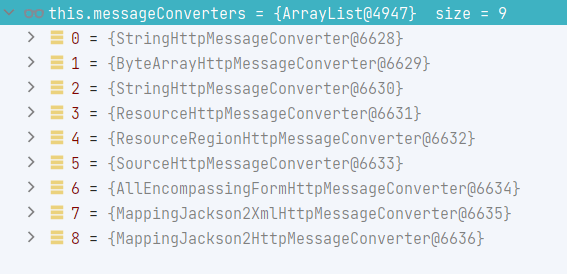
MappingJackson2HttpMessageConverter 和 MappingJackson2XmlHttpMessageConverter 都可以解析 JavaBean 对象。
注意,这个时候 MappingJackson2XmlHttpMessageConverter 是排在 MappingJackson2HttpMessageConverter 的前面的。即在调用 AbstractMessageConverterMethodProcessor 的 getAcceptableMediaTypes 的时候,xml 格式对相应的 MediaType 会排在 JSON 格式对应的 MediaType 的前面,在 AbstractMessageConverterMethodProcessor 的 writeWithMessageConverters 方法中,从满足要求的 MediaType 列表中取第一个 MediaType 作为最终的 MediaType 的时候,会优先选择 xml 格式对相应的 MediaType,所以,引入这两个依赖之后,如果不指定内容协商的参数,在 @ResponseBody 修饰的控制器方法返回 JavaBean 类型的返回值,默认会解析成 XML 放入响应的消息体中。(XML 格式的)
当然,如果你不需要对 XML 格式的支持,你也可以不导入 jackson-dataformat-xml 依赖,这样在 @ResponseBody 修饰的控制器方法返回 JavaBean 类型的返回值的时候,就只有 MappingJackson2HttpMessageConverter 可以解析,响应的消息体的格式自然也就是 JSON 格式的了。
结论
在经过了简单的分析之后,我们发现,我们可以有以下几点可以挖掘
-
通过在 URL 中是指定格式,让
ServletPathExtensionContentNegotiationStrategy生效 -
在请求的消息头中设置相应的字段(一般是
Accept),让HeaderContentNegotiationStrategy生效 -
配置控制器方法的
@RequestMapping注解中的 producers -
配置更多的
ContentNegotiationStrategy实现,比如默认没有添加的ParameterContentNegotiationStrategy和FixedContentNegotiationStrategy -
配置更多的
HttpMessageConverter实现
而这些刚好就是我们接下来要谈到的几种 SpringMVC 的内容协商方式。
HTTP 头 Accept
在上面的例子中,我们可以通过指定请求的消息体的 Accept 来指定客户端想要的格式
@Test
@SneakyThrows
void getUserWithAccept() {
    mockMvc.perform(get("/ContentNegotiation/user").accept(MediaType.APPLICATION_JSON_VALUE)).andExpect(content().contentType(MediaType.APPLICATION_JSON_VALUE)).andDo(print());
}
测试结果:
MockHttpServletRequest:
      HTTP Method = GET
      Request URI = /ContentNegotiation/user
       Parameters = {}
          Headers = [Accept:"application/json"]
             Body = <no character encoding set>
    Session Attrs = {}

Handler:
             Type = xyz.xiashuo.springmvccontentnegotiation.controller.ContentNegotiationController
           Method = xyz.xiashuo.springmvccontentnegotiation.controller.ContentNegotiationController#getUser()

Async:
    Async started = false
     Async result = null

Resolved Exception:
             Type = null

ModelAndView:
        View name = null
             View = null
            Model = null

FlashMap:
       Attributes = null

MockHttpServletResponse:
           Status = 200
    Error message = null
          Headers = [Content-Type:"application/json"]
     Content type = application/json
             Body = {"name":"xiashuo","gender":"female","email":"[email protected]","age":20}
    Forwarded URL = null
   Redirected URL = null
          Cookies = []
分析
在前面我们知道,在默认情况下,strategies 中只包含 ServletPathExtensionContentNegotiationStrategy 和 HeaderContentNegotiationStrategy,而且 ServletPathExtensionContentNegotiationStrategy 排在前面,现在的测试代码中,我们没有设置 URL 的后缀名,所以 ServletPathExtensionContentNegotiationStrategy 无效,我们直接看 HeaderContentNegotiationStrategy。
HeaderContentNegotiationStrategy 对 resolveMediaTypes 方法的实现很简单,request.getHeaderValues(HttpHeaders.ACCEPT) 固定地获取 ACCEPT 消息头的内容,结果为一个字符串数组,然后将这个字符串数组转化为 MediaType 数组返回。后续的逻辑前面已经介绍过了,这里就不赘述了。
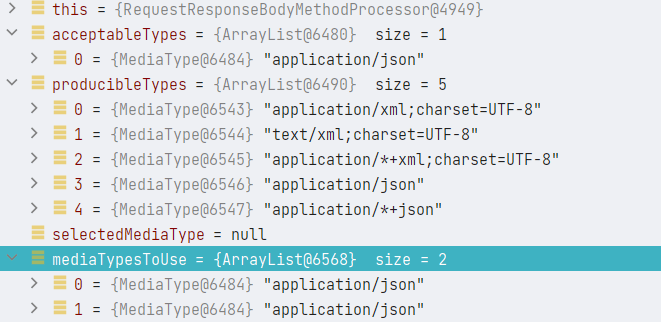
acceptableTypes 根据 HeaderContentNegotiationStrategy,得出为 json,而 producibleTypes 根据系统配置的 HttpMessageConverter,得出为 xml 和 json,经过协商(取并集),得出,最终应该返回 json 格式。
同理,我们也可以获取 xml 格式,只要我们有相应的 HttpMessageConverter,系统可以支持在相应的消息体中写入任意格式的数据。
@Test
@SneakyThrows
void getUserWithAcceptForXML() {
    mockMvc.perform(get("/ContentNegotiation/user").accept(MediaType.APPLICATION_XML_VALUE)).andExpect(content().contentType("application/xml;charset=UTF-8")).andDo(print());
}
PS:
虽然引入了 MappingJackson2XmlHttpMessageConverter 之后让返回对象的时候的默认消息体变成了 xml,需要手动指定 accept 才能获取 json 格式的消息体,但是我们依然建议引入 MappingJackson2XmlHttpMessageConverter,毕竟丰富了服务器提供的响应体的格式。
优缺点
- 优点:理想的标准方式
- 缺点:由于浏览器的差异,导致不同的浏览器默认的 Accept Header 头可能会不一样,从而得到的结果不具备浏览器兼容性
扩展名 - suffix Pattern
添加测试用的控制器方法
@RequestMapping("/user.*")
@ResponseBody
public User getUserWithSuffixes() {
    User user = new User("xiashuo", "female", "[email protected]", 20);
    return user;
}
测试方法
@Test
@SneakyThrows
void getUserWithSuffixes() throws Exception {
    mockMvc.perform(get("/ContentNegotiation/user.json")).andExpect(content().contentType(MediaType.APPLICATION_JSON_VALUE)).andDo(print());
}

@Test
@SneakyThrows
void getUserWithSuffixesForXML() throws Exception {
    mockMvc.perform(get("/ContentNegotiation/user.xml")).andExpect(content().contentType("application/xml;charset=UTF-8")).andDo(print());
}
输入日志
getUserWithSuffixes 方法:
MockHttpServletRequest:
      HTTP Method = GET
      Request URI = /ContentNegotiation/user.json
       Parameters = {}
          Headers = [Accept:"application/json"]
             Body = <no character encoding set>
    Session Attrs = {}

Handler:
             Type = xyz.xiashuo.springmvccontentnegotiation.controller.ContentNegotiationController
           Method = xyz.xiashuo.springmvccontentnegotiation.controller.ContentNegotiationController#getUserWithSuffixes()

Async:
    Async started = false
     Async result = null

Resolved Exception:
             Type = null

ModelAndView:
        View name = null
             View = null
            Model = null

FlashMap:
       Attributes = null

MockHttpServletResponse:
           Status = 200
    Error message = null
          Headers = [Content-Type:"application/json"]
     Content type = application/json
             Body = {"name":"xiashuo","gender":"female","email":"[email protected]","age":20}
    Forwarded URL = null
   Redirected URL = null
          Cookies = []
getUserWithSuffixesForXML 方法
MockHttpServletRequest:
      HTTP Method = GET
      Request URI = /ContentNegotiation/user.xml
       Parameters = {}
          Headers = [Accept:"application/json"]
             Body = <no character encoding set>
    Session Attrs = {}

Handler:
             Type = xyz.xiashuo.springmvccontentnegotiation.controller.ContentNegotiationController
           Method = xyz.xiashuo.springmvccontentnegotiation.controller.ContentNegotiationController#getUserWithSuffixes()

Async:
    Async started = false
     Async result = null

Resolved Exception:
             Type = null

ModelAndView:
        View name = null
             View = null
            Model = null

FlashMap:
       Attributes = null

MockHttpServletResponse:
           Status = 200
    Error message = null
          Headers = [Content-Type:"application/xml;charset=UTF-8"]
     Content type = application/xml;charset=UTF-8
             Body = <User><name>xiashuo</name><gender>female</gender><email>[email protected]</email><age>20</age></User>
    Forwarded URL = null
   Redirected URL = null
          Cookies = []
简单分析
在 ServletPathExtensionContentNegotiationStrategy 的 resolveMediaTypes 方法继承自 AbstractMappingContentNegotiationStrategy
public List<MediaType> resolveMediaTypes(NativeWebRequest webRequest) throws HttpMediaTypeNotAcceptableException {
    //  getMediaTypeKey的作用是,获取请求中的可以获取 MediaType 的关键信息
    // 这个方法由子类实现
    // 一个实现是 ParameterContentNegotiationStrategy 直接在查询参数中查找
    // 一个实现是 PathExtensionContentNegotiationStrategy 在URL的拓展名中查找
    return resolveMediaTypeKey(webRequest, getMediaTypeKey(webRequest));
}
ParameterContentNegotiationStrategy 对应这后面的章节,
请求参数
ServletPathExtensionContentNegotiationStrategy 继承自 PathExtensionContentNegotiationStrategy,所以走的是 PathExtensionContentNegotiationStrategy,方法内容很简单,通过 UriUtils.extractFileExtension(path) 获取了 URL 的后缀。
然后继续调用 AbstractMappingContentNegotiationStrategy 的 resolveMediaTypeKey,方法内容也很简单,直接通过调用 lookupMediaType 传入拓展名找到对应的 MediaType。
AbstractMappingContentNegotiationStrategy继承了MappingMediaTypeFileExtensionResolver,所以可以使用lookupMediaType。
MappingMediaTypeFileExtensionResolver维护了一个文件扩展名和MediaType的双向查找表。
然后剩下的流程,就跟设置 HTTP 消息头 Accept 一样了
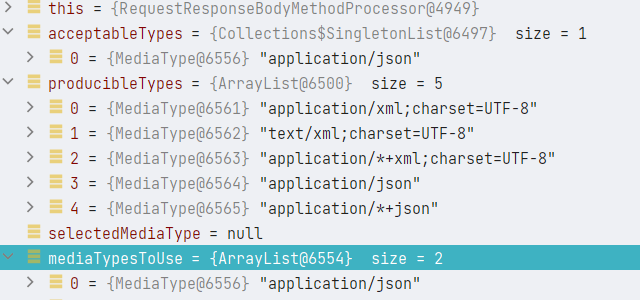
注意,前面我们提到过,扩展名优先级比 Accept 要高,说根据路径中的后缀进行内容协商的优先级是排在根据请求消息头中的 Accept 前面的。同时指定 URL 后缀和请求的消息头,只有 URL 后缀会生效,请求的消息头不会生效。
优缺点
- 优点:灵活,且明确指定需要的相应的消息体的格式,不受浏览器影响
- 缺点:对于 URL 的格式有要求,控制器方法的 URL 的写法必须兼容带后缀的格式,对 REST 风格的 URL 带来了限制,简而言之,失去了 URL 的灵活性。
在实际环境中使用还是较多的
请求参数
注意,请求参数协商默认是关闭的,需要手动打开
<mvc:annotation-driven content-negotiation-manager="contentNegotiationManager"/>

<bean id="contentNegotiationManager"
      class="org.springframework.web.accept.ContentNegotiationManagerFactoryBean">
<!--        <property name="favorPathExtension" value="false" />-->
    <property name="favorParameter" value="true"/>
<!--        <property name="parameterName" value="mediaType"/>-->
<!--        <property name="ignoreAcceptHeader" value="true" />-->
<!--        <property name="defaultContentType" value="application/json" />-->
<!--        <property name="useJaf" value="false" />-->

    <property name="mediaTypes">
        <map>
            <entry key="json" value="application/json" />
            <entry key="xml" value="application/xml" />
        </map>
    </property>
</bean>
测试类
Test
@SneakyThrows
void getUserWithParams() throws Exception {
    mockMvc.perform(get("/ContentNegotiation/user").queryParam("format","json")).andExpect(content().contentType(MediaType.APPLICATION_JSON_VALUE)).andDo(print());
}

@Test
@SneakyThrows
void getUserWithParamsForXML() throws Exception {
    mockMvc.perform(get("/ContentNegotiation/user").queryParam("format","xml")).andExpect(content().contentType("application/xml;charset=UTF-8")).andDo(print());
}
日志
getUserWithParams 的日志
MockHttpServletRequest:
      HTTP Method = GET
      Request URI = /ContentNegotiation/user
       Parameters = {format=[json]}
          Headers = []
             Body = <no character encoding set>
    Session Attrs = {}

Handler:
             Type = xyz.xiashuo.springmvccontentnegotiation.controller.ContentNegotiationController
           Method = xyz.xiashuo.springmvccontentnegotiation.controller.ContentNegotiationController#getUser()

Async:
    Async started = false
     Async result = null

Resolved Exception:
             Type = null

ModelAndView:
        View name = null
             View = null
            Model = null

FlashMap:
       Attributes = null

MockHttpServletResponse:
           Status = 200
    Error message = null
          Headers = [Content-Type:"application/json"]
     Content type = application/json
             Body = {"name":"xiashuo","gender":"female","email":"[email protected]","age":20}
    Forwarded URL = null
   Redirected URL = null
          Cookies = []
getUserWithParamsForXML 的日志
MockHttpServletRequest:
      HTTP Method = GET
      Request URI = /ContentNegotiation/user
       Parameters = {format=[xml]}
          Headers = []
             Body = <no character encoding set>
    Session Attrs = {}

Handler:
             Type = xyz.xiashuo.springmvccontentnegotiation.controller.ContentNegotiationController
           Method = xyz.xiashuo.springmvccontentnegotiation.controller.ContentNegotiationController#getUser()

Async:
    Async started = false
     Async result = null

Resolved Exception:
             Type = null

ModelAndView:
        View name = null
             View = null
            Model = null

FlashMap:
       Attributes = null

MockHttpServletResponse:
           Status = 200
    Error message = null
          Headers = [Content-Type:"application/xml;charset=UTF-8"]
     Content type = application/xml;charset=UTF-8
             Body = <User><name>xiashuo</name><gender>female</gender><email>[email protected]</email><age>20</age></User>
    Forwarded URL = null
   Redirected URL = null
          Cookies = []
简单分析,此时参与内容协商的总共由三个策略,顺序是:ServletPathExtensionContentNegotiationStrategy、ParameterContentNegotiationStrategy、HeaderContentNegotiationStrategy。
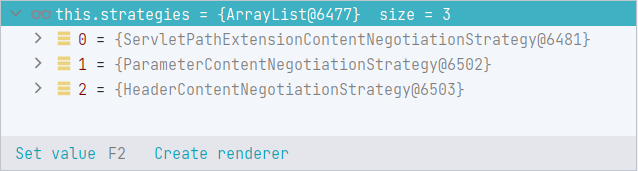
即,如果按照 URL 后缀策略解析了请求得出了客户端想要的 MediaType,那么就不会再按照请求参数或者请求消息头来解析,如果没有指定 URL 后缀参数,那么就按照请求参数解析,如果解析成功(结果不为 */*),那就不会考虑请求消息头,只有前两种策略对应参数都不存在或者没有解析成功,才会考虑请求消息头中的 Accept 参数。
因为我们这里只指定了 ParameterContentNegotiationStrategy 读取的参数,所以只有 ParameterContentNegotiationStrategy 的解析是有效的,我们直接看 ParameterContentNegotiationStrategy 的解析。
在 ParameterContentNegotiationStrategy 的 resolveMediaTypes 方法继承自 AbstractMappingContentNegotiationStrategy
public List<MediaType> resolveMediaTypes(NativeWebRequest webRequest) throws HttpMediaTypeNotAcceptableException {
    //  getMediaTypeKey的作用是,获取请求中的可以获取 MediaType 的关键信息
    // 这个方法由子类实现
    // 一个实现是 ParameterContentNegotiationStrategy 直接在查询参数中查找
    // 一个实现是 PathExtensionContentNegotiationStrategy 在URL的拓展名中查找
    return resolveMediaTypeKey(webRequest, getMediaTypeKey(webRequest));
}
ServletPathExtensionContentNegotiationStrategy继承自PathExtensionContentNegotiationStrategy对应前一小节,扩展名 - suffix Pattern
ParameterContentNegotiationStrategy 对 getMediaTypeKey 方法的实现很简单,直接通过 request.getParameter(getParameterName()) 获取请求参数,请求参数名默认为 format。
这个参数名,也是可以定制的,如果这个参数名跟业务所需的参数名冲突了,那就有了定制的需求,一般加一个
_前缀与常规的业务参数进行区分。
然后继续调用 AbstractMappingContentNegotiationStrategy 的 resolveMediaTypeKey,方法内容也很简单,,直接通过调用 lookupMediaType 传入拓展名找到对应的 MediaType。
AbstractMappingContentNegotiationStrategy继承了MappingMediaTypeFileExtensionResolver,所以可以使用lookupMediaType。
MappingMediaTypeFileExtensionResolver维护了一个文件扩展名和MediaType的双向查找表。
然后剩下的流程,就跟设置 HTTP 消息头 Accept 一样了
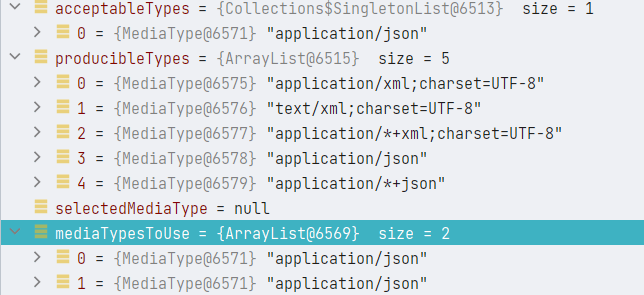
优缺点
- 优点:参数额外指定,不受浏览器影响
- 缺点:需要额外的传递 format 参数,还需手动显示开启
其实我觉得这种方式比在 URL 后面添加后缀要好很多,毕竟不用修改 URL。而且将客户端想要的格式作为一个专门参数传递,也合情合理,话说回来,Accept 消息头就是这个参数,只是这个参数是 HTTP 层的,很容易被浏览器污染,对程序员来说,不那么好控制,所以这里专门又提取出了一个参数。
固定类型 - @RequestMapping 的 producers 属性
由@RequestMapping 的 produces 属性确定控制器方法返回的响应的消息体的最终 MediaType,但是指定@RequestMapping 的 produces 属性也意味着这个控制器方法只能匹配消息体中请求头中的 Accept 为指定类型的请求,否则,你都无法进入指定的控制器方法,即@RequestMapping 的 produces 属性必须配合请求消息头中的 Accept 一起使用。限制很大。
在深入学习请求的处理器中的内容协商之后,可以得知,指定
Accept消息头的效果,其实等同于指定 URL 后缀或者请求参数format。这些配置都可以跟 produces 进行匹配,默认的配置优先级是 URL 后缀 > 请求参数format>Accept消息头
此外,使用 @RequestMapping 的 producers 属性进行内容协商跟内容协商接口的实现原理不一样,这两种方式是可以共同生效的,内容协商策略接口的实例的顺序会影响对客户端想要的 MediaType 的分析结果,
@RequestMapping 的 producers 属性会对影响当前控制器方法能够提供的 MediaType 的分析结果,在上面的源码分析中可以得知,这两个结果如果没有交集,就会报错。AbstractMessageConverterMethodProcessor 的 writeWithMessageConverters 方法代码片段:
HttpServletRequest request = inputMessage.getServletRequest();
// 经过内容协商,根据请求分析客户端想要的 MediaType
List<MediaType> acceptableTypes = getAcceptableMediaTypes(request);
// 获取当前控制器方法能够提供的 MediaType
List<MediaType> producibleTypes = getProducibleMediaTypes(request, valueType, targetType);

if (body != null && producibleTypes.isEmpty()) {
    throw new HttpMessageNotWritableException(
            "No converter found for return value of type: " + valueType);
}
// 进行内容协商,获取当前控制器方法能够提供的同时也满足客户端要求的 MediaType 列表
List<MediaType> mediaTypesToUse = new ArrayList<>();
for (MediaType requestedType : acceptableTypes) {
    for (MediaType producibleType : producibleTypes) {
        if (requestedType.isCompatibleWith(producibleType)) {
            mediaTypesToUse.add(getMostSpecificMediaType(requestedType, producibleType));
        }
    }
}
if (mediaTypesToUse.isEmpty()) {
    if (body != null) {
        throw new HttpMediaTypeNotAcceptableException(producibleTypes);
    }
    if (logger.isDebugEnabled()) {
        logger.debug("No match for " + acceptableTypes + ", supported: " + producibleTypes);
    }
    return;
}
所以,使用@RequestMapping 的 producers 属性的内容不能跟内容协商接口的实现确定的媒体类型冲突,比如,producers 属性指定了 json 格式,如果你这么访问 /test.xml,或者 format=xml,或者 Accept 不是 application/json或者*/* 将无法完成内容协商。
在深入学习请求的处理器中的内容协商之后,可以得知,
@RequestMapping修饰的控制器方法在请求处理映射中的内容协商跟返回值转化为特定格式的消息体的内容协商,其实是同一套代码,同一套逻辑,所以,通过了 produces 属性匹配的请求,其在进行响应消息体的内容协商的时候,就不会发生@RequestMapping 的 producers 属性的内容不能跟内容协商接口的实现确定的媒体类型冲突。
简单实践
控制器方法
@RequestMapping(value = "/user",produces = MediaType.APPLICATION_JSON_VALUE)
@ResponseBody
public User getUserWithProducesForJSON() {
    User user = new User("xiashuo", "female", "[email protected]", 20);
    return user;
}

@RequestMapping(value = "/user",produces = MediaType.APPLICATION_XML_VALUE)
@ResponseBody
public User getUserWithProducesForXML() {
    User user = new User("xiashuo", "female", "[email protected]", 20);
    return user;
}
测试类
@Test
@SneakyThrows
void getUserWithProducesForJSON() throws Exception {
    //mockMvc.perform(get("/ContentNegotiation/user").accept(MediaType.APPLICATION_JSON_VALUE)).andExpect(content().contentType(MediaType.APPLICATION_JSON_VALUE)).andDo(print());
    mockMvc.perform(get("/ContentNegotiation/user").accept(MediaType.APPLICATION_JSON_VALUE)).andExpect(content().contentType(MediaType.APPLICATION_JSON_VALUE)).andDo(print());
}

@Test
@SneakyThrows
void getUserWithProducesForJSONTakeOtherParameter() throws Exception {
    //mockMvc.perform(get("/ContentNegotiation/user").accept(MediaType.APPLICATION_JSON_VALUE)).andExpect(content().contentType(MediaType.APPLICATION_JSON_VALUE)).andDo(print());
    mockMvc.perform(get("/ContentNegotiation/user").queryParam("format","json")).andExpect(content().contentType(MediaType.APPLICATION_JSON_VALUE)).andDo(print());
}

@Test
@SneakyThrows
void getUserWithProducesForXML() throws Exception {
    mockMvc.perform(get("/ContentNegotiation/user").accept(MediaType.APPLICATION_XML_VALUE)).andExpect(content().contentType(MediaType.APPLICATION_XML_VALUE)).andDo(print());
}
日志就不贴了,都是意料之中的结果。
简单分析一下
在配置了 @RequestMapping(value = "/user",produces = MediaType.APPLICATION_JSON_VALUE) 中的 produces 属性之后,AbstractMessageConverterMethodProcessor 的 getProducibleMediaTypes 方法现在可以拿到 produces 属性的值了。
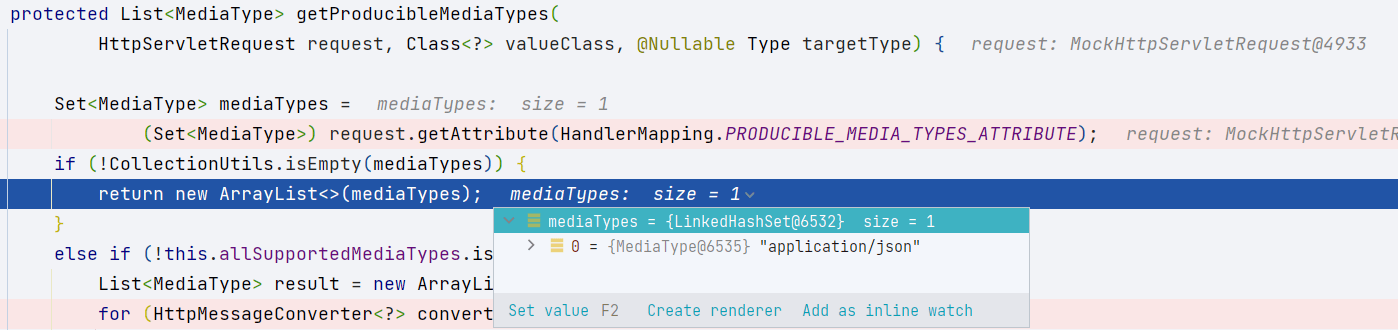
测试方法 getUserWithProducesForJSONTakeOtherParameter 可以正常访问 @RequestMapping(value = "/user",produces = MediaType.APPLICATION_JSON_VALUE) 修饰的控制器方法,这说明,在请求的处理器映射中,也是可以使用内容协商的,指定 Accept 消息头的效果,其实等同于指定 URL 后缀或者请求参数 format。
优缺点:
- 优点:使用简单,天然支持
- 缺点:对处理器映射增加了限制
一般情况下我们为了保证接口返回值的多样性,不会轻易使用 produces 属性,我们更喜欢传递 format 参数,这样同一个借口可以返回多种格式的(消息体)的响应
视图内容协商
TODO
内容协商在视图View上的应用【享学Spring MVC】 - YourBatman - 博客园
有需要再看
请求协商在控制器映射中的作用
请求协商在控制器映射中也有作用,主要是跟 @RequestMapping 的 consumes 和 produces 进行匹配和协商
这个很重要,赶紧开始学习请求映射相关的内容
学习完这些视频之后,一定要再回去学习请求映射的过程,然后注意一下内容协商对处理器映射的影响
TODO
详解相关源码
ContentNegotiationStrategy
ContentNegotiationStrategy 是一个函数式接口,除了,只有一个方法,就是 resolveMediaTypes,作用是,解析出给定的请求的想要的媒体类型的列表,返回的 List 首先会按照 specificity 参数(MediaType.SPECIFICITY_COMPARATOR 比较器)排序,其次按照 quality 参数(MediaType.QUALITY_VALUE_COMPARATOR 比较器)排序。
除此之外还有一个静态的接口属性,ContentNegotiationStrategy.MEDIA_TYPE_ALL_LIST,表示匹配所有的 MediaType,一般在具体的 ContentNegotiationStrategy 实现没有成功解析出请求中的 MediaType 类型的时候返回,表示解析失败。
狭义的来说,内容协商(ContentNegotiationStrategy),实际上就是解析出给定的请求的想要的媒体类型的列表,最终响应的消息体是什么媒体格式的,以及相应的类型转换操作,都需要跟 HttpMessageConverter 配合。
MediaTypeFileExtensionResolver
作用是将一个 MediaType 解析成对应的一个或者多个文件拓展名(file extension),比如将 "application/json" 解析成 "json",接口方法 resolveFileExtensions 就表示这个功能,具体实现由子类实现,还有一个方法 getAllFileExtensions,表示此解析器中注册的所有文件拓展名。
MappingMediaTypeFileExtensionResolver
MediaTypeFileExtensionResolver 的直接实现类,实现 MediaTypeFileExtensionResolver#resolveFileExtensions 的方式很简单,它维护了一个从文件拓展名到 MediaType 和一个从 MediaType 到多个文件拓展名的 Map 映射,同时顺便用一个 List 来保存两个映射中保存所有的文件拓展名,进而实现 MediaTypeFileExtensionResolver#getAllFileExtensions。
这三个字段的信息可以在构造实例的时候在构造器中传入,构造之后,也可以通过 addMapping 方法更新
而且因为 MappingMediaTypeFileExtensionResolver 中也包含从文件拓展名到 MediaType 的映射,所以你也可以通过调用 lookupMediaType 方法来查询文件拓展名对应的 MediaType
根据后面在
通过Java配置小节中对ContentNegotiationConfigurer和在ContentNegotiationManagerFactoryBean小节中对ContentNegotiationManagerFactoryBean的解析可知,这个关系,最终还是通过ContentNegotiationConfigurer的mediaType和mediaTypes和replaceMediaTypes属性来配置并传入。
AbstractMappingContentNegotiationStrategy
继承了 MappingMediaTypeFileExtensionResolver(间接的实现了 MediaTypeFileExtensionResolver),同时实现了 ContentNegotiationStrategy,其实这个类的功能主要还是以实现 ContentNegotiationStrategy 为主,对 MediaTypeFileExtensionResolver 的实现,只是拓展了一种从请求中解析出想要的 MediaType 的列表的能力。即,从 URL 包含的文件拓展名中推断出 MediaType
看构造函数,构造函数,传入文件拓展名和 MediaType 类型的映射 map,这个映射 Map 会用于在 MappingMediaTypeFileExtensionResolver 中初始化那两个双向查找的映射关系 Map 和一个保存映射关系中的所有文件拓展名,我们可以将这些通过构造函数传入的映射关系视为注册的映射关系。注意,构造器传入的文件拓展名和 MediaType 类型的映射很重要,如果太小,会非常影响解析的效率。
public AbstractMappingContentNegotiationStrategy(@Nullable Map<String, MediaType> mediaTypes) {
    super(mediaTypes);
}
然后直接看对 ContentNegotiationStrategy 接口的实现, 直接委托给 resolveMediaTypeKey,
@Override
public List<MediaType> resolveMediaTypes(NativeWebRequest webRequest) throws HttpMediaTypeNotAcceptableException {
    // 直接委托给 resolveMediaTypeKey
    // 不过首先要通过 getMediaTypeKey 获取关键信息,这个关键信息,就是请求中包含的文件拓展名,用来根据文件拓展名来查找对应的MediaType
    // getMediaTypeKey是抽象方法,留待子类实现
    return resolveMediaTypeKey(webRequest, getMediaTypeKey(webRequest));
}
不过首先要通过 getMediaTypeKey 方法获取关键信息,这个关键信息,就是请求中包含的文件拓展名,比如 "json"、 "pdf",(可以通过 url 的文件拓展名,也可以通过查询参数,file extension or query param),然后用这个文件拓展名来查找对应的 MediaType,getMediaTypeKey 是抽象方法,留待子类实现。
只有两个实现类,即
ServletPathExtensionContentNegotiationStrategy和ParameterContentNegotiationStrategy
ServletPathExtensionContentNegotiationStrategy对getMediaTypeKey的实现:直接从请求的路径的文件拓展名中获取
ParameterContentNegotiationStrategy对getMediaTypeKey的实现:从请求中的固定参数名中获取,这个请求参数,可以是路径后面跟着的参数,也可以是请求消息体中的格式为application/x-www-form-urlencoded的消息体中的参数。
接下来来看 resolveMediaTypeKey 方法,注意,如果没有在所有注册的文件拓展名和 MediaType 的映射中查找到当前文件拓展名对应的 MediaType,则根据配置在默认的文件拓展名和 MediaType 的映射关系中进行进一步的查找。
public List<MediaType> resolveMediaTypeKey(NativeWebRequest webRequest, @Nullable String key)
        throws HttpMediaTypeNotAcceptableException {

    if (StringUtils.hasText(key)) {
        // 直接根据父类MappingMediaTypeFileExtensionResolver中的lookupMediaType方法根据文件拓展名查找对应的 MediaType
        MediaType mediaType = lookupMediaType(key);
        if (mediaType != null) {
            // 钩子,用于在返回 MediaType 之前进行额外的处理,目前还没有子类实现
            handleMatch(key, mediaType);
            return Collections.singletonList(mediaType);
        }
        // 钩子
        // 如果没有在所有注册的 文件拓展名 和 MediaType 的映射中查找到 当前文件拓展名对应的MediaType,则根据配置在默认的文件拓展名和MediaType的映射关系中进行进一步的查找
        mediaType = handleNoMatch(webRequest, key);
        if (mediaType != null) {
            // 如果在默认的文件拓展名和MediaType的映射关系中找到了,添加到注册的文件拓展名 和 MediaType的关系中,相当于"缓存"更新,下一次就不用在默认的文件拓展名和MediaType的映射关系中查找了
            addMapping(key, mediaType);
            return Collections.singletonList(mediaType);
        }
    }
    // 请求中的文件拓展名为空,直接返回 ContentNegotiationStrategy.MEDIA_TYPE_ALL_LIST,表示此ContentNegotiationStrategy的实现没有成功解析
    return MEDIA_TYPE_ALL_LIST;
}
这个方法留了两个钩子方法,一个是 handleMatch,一个是 handleNoMatch,handleMatch 目前还没有子类实现,我们先看看 handleNoMatch
很有意思,首先根据 useRegisteredExtensionsOnly(默认为 false)判断是否仅仅从构造函数中传入的文件拓展名和 MediaType 中查找,如果是,则不进行进一步的查找了,如果不是,则进一步在跟 MediaTypeFactory 同目录下的 /org/springframework/http/mime.types 中查找文件拓展名对应的 MediaType,找到了就直接返回,后面的代码就不会执行了。如果 useRegisteredExtensionsOnly 为 true,或者进一步查找没找到,则需要根据 ignoreUnknownExtensions 判断要不要忽略这个问题, 如果不忽略,则报错,提示 URL 有毛病, 如果忽略,则直接返回 null,然后不报错,当无事发生。
注意,ServletPathExtensionContentNegotiationStrategy 重写了 handleNoMatch
protected MediaType handleNoMatch(NativeWebRequest request, String key) throws HttpMediaTypeNotAcceptableException {

    // 是否仅仅从构造函数中传入的文件拓展名和MediaType中查找,如果是,则不进行进一步的查找了,如果不是,则进一步查找
    // 这里是否从默认映射文件中查找有一个字段专门用于配置,即useRegisteredExtensionsOnly,默认为false
    if (!isUseRegisteredExtensionsOnly()) {
        // MediaTypeFactory.getMediaType 会在跟MediaTypeFactory同目录下的 /org/springframework/http/mime.types 中查找文件拓展名对应的 MediaType
        Optional<MediaType> mediaType = MediaTypeFactory.getMediaType("file." + key);
        if (mediaType.isPresent()) {
            // 找到了就直接返回,后面的代码就不会执行了
            return mediaType.get();
        }
    }

    // 如果最终还是没有找到URL中包含的文件拓展名对应的MediaType,那要不要忽略这个问题,
    // 如果不忽略,则报错,提示URL有毛病,
    // 如果忽略,则直接返回null,然后不报错,当无事发生
    // 这个是否忽略也有一个全局变量用进行配置,即ignoreUnknownExtensions,默认为false
    if (isIgnoreUnknownExtensions()) {
        return null;
    }
    throw new HttpMediaTypeNotAcceptableException(getAllMediaTypes());
}
ContentNegotiationStrategy 和 MediaTypeFileExtensionResolver 的具体实现
接下来就比较轻松了,这个在前面的 SpringMVC的四种内容协商方式 小节中基本上都了解过了。
FixedContentNegotiationStrategy
FixedContentNegotiationStrategy 的作用是不管请求是什么,都固定的返回一个构造的时候传入的 MediaType 列表,大部分的场景下都用不上这个 Strategy。主要是这个 ContentNegotiationStrategy 的实现很适合用作兜底的默认的 ContentNegotiationStrategy,所以一般在 ContentNegotiationManager 中注册 ContentNegotiationStrategy 的时候,FixedContentNegotiationStrategy 排在最后,而且 ContentNegotiationManagerFactoryBean#defaultNegotiationStrategy 的默认实现就是 FixedContentNegotiationStrategy。
HeaderContentNegotiationStrategy
HeaderContentNegotiationStrategy 对 resolveMediaTypes 方法的实现很简单,request.getHeaderValues(HttpHeaders.ACCEPT) 固定地获取 ACCEPT 消息头的内容,结果为一个字符串数组,然后将这个字符串数组转化为 MediaType 数组返回。
因为请求头中的
accept请求头可以直接跟 MediaType 进行转化,因此,而ServletPathExtensionContentNegotiationStrategy和ParameterContentNegotiationStrategy只能传递简单的文件拓展名,所以需要继承AbstractMappingContentNegotiationStrategy来获得将文件拓展名映射成 MediaType 的能力。
ServletPathExtensionContentNegotiationStrategy - 不推荐使用
ServletPathExtensionContentNegotiationStrategy 继承自 PathExtensionContentNegotiationStrategy,这两个类因为继承了 AbstractMappingContentNegotiationStrategy,因此在构造的时候,需要在构造器中传入一个文件拓展名和 MediaType 类型的映射 map,我们将这些通过构造函数传入的映射关系为注册的映射关系。
PathExtensionContentNegotiationStrategy 继承了 AbstractMappingContentNegotiationStrategy,实现了非常重要的 getMediaTypeKey 方法,方式很简单:直接从请求的路径的文件拓展名中获取。
@Override
@Nullable
protected String getMediaTypeKey(NativeWebRequest webRequest) {
    HttpServletRequest request = webRequest.getNativeRequest(HttpServletRequest.class);
    if (request == null) {
        return null;
    }
    // Ignore LOOKUP_PATH attribute, use our own "fixed" UrlPathHelper with decoding off
    // 通过 urlPathHelper 获取请求中用于查找的部分路径
    String path = this.urlPathHelper.getLookupPathForRequest(request);
    // 获取后缀名
    String extension = UriUtils.extractFileExtension(path);
    return (StringUtils.hasText(extension) ? extension.toLowerCase(Locale.ENGLISH) : null);
}
ServletPathExtensionContentNegotiationStrategy 直接继承 PathExtensionContentNegotiationStrategy,当然也继承了 getMediaTypeKey 方法的实现,此外,它还重写了两个方法:
-
handleNoMatch,在从,先尝试通过servletContext#getMimeType来解析文件拓展名String mimeType = this.servletContext.getMimeType("file." + extension);,要是没找到,再在跟 MediaTypeFactory 同目录下的/org/springframework/http/mime.types中查找文件拓展名对应的 MediaType -
getMediaTypeForResource根据传入的Resource的文件名中的拓展名来查找对应的 MediaType。重点也是添加了尝试通过servletContext#getMimeType来解析文件拓展名的操作。以后用到了再去解析
ParameterContentNegotiationStrategy - 推荐使用
ParameterContentNegotiationStrategy 因为继承了 AbstractMappingContentNegotiationStrategy,因此在构造的时候,需要在构造器中传入一个文件拓展名和 MediaType 类型的映射 map,我们将这些通过构造函数传入的映射关系为注册的映射关系。我们经常使用 ParameterContentNegotiationStrategy 来进行内容协商,当我们需要进行特殊格式的文件拓展名的映射的时候,我们可以通过自定义这个 map 来实现。或者通过 addMapping(继承自 MappingMediaTypeFileExtensionResolver)方法来实现。
ParameterContentNegotiationStrategy 对 getMediaTypeKey 方法的实现很简单,直接通过 request.getParameter(getParameterName()) 在请求参数中查找,这个请求参数,可以是路径后面跟着的参数,也可以是请求消息体中的格式为 application/x-www-form-urlencoded 的消息体中的参数。请求参数名默认为 format。当然,这个参数名也是可以定义的。
@Override
@Nullable
protected String getMediaTypeKey(NativeWebRequest request) {
    // 很简单,直接从请求参数中查找
    return request.getParameter(getParameterName());
}
非常简单。
ContentNegotiationManager
确定请求的 MediaType(媒体类型)的中心类。ContentNegotiationManager 同时实现了 ContentNegotiationStrategy 和 MediaTypeFileExtensionResolver,与此同时它既是一个 ContentNegotiationStrategy 容器,同时也是一个 MediaTypeFileExtensionResolver 容器。
private final List<ContentNegotiationStrategy> strategies = new ArrayList<>();
// 从strategies中实现了MediaTypeFileExtensionResolver接口的strategy转化而来
private final Set<MediaTypeFileExtensionResolver> resolvers = new LinkedHashSet<>();
这两个字段在构造
ContentNegotiationManager的时候初始化
对这两个接口的实现都是委托给内部的这两个 Collection 容器来完成:
对 ContentNegotiationStrategy 的实现,注意,众多解析策略中,哪个先解析成功,就用哪个解析出来的 mediaTypes,后面的不会再解析,所以解析策略的先后顺序很重要。
@Override
public List<MediaType> resolveMediaTypes(NativeWebRequest request) throws HttpMediaTypeNotAcceptableException {
    for (ContentNegotiationStrategy strategy : this.strategies) {
        List<MediaType> mediaTypes = strategy.resolveMediaTypes(request);
        if (mediaTypes.equals(MEDIA_TYPE_ALL_LIST)) {
            continue;
        }
        // 众多解析策略中,哪个先解析成功,就用哪个解析出来的mediaTypes
        return mediaTypes;
    }
    return MEDIA_TYPE_ALL_LIST;
}
对 MediaTypeFileExtensionResolver 接口的实现
@Override
public List<String> resolveFileExtensions(MediaType mediaType) {
    // Function 是一个函数式接口
    return doResolveExtensions(resolver -> resolver.resolveFileExtensions(mediaType));
}

private List<String> doResolveExtensions(Function<MediaTypeFileExtensionResolver, List<String>> extractor) {
    List<String> result = null;
    for (MediaTypeFileExtensionResolver resolver : this.resolvers) {
        // 遍历所有的 resolver 的 resolveFileExtensions方法
        List<String> extensions = extractor.apply(resolver);
        if (CollectionUtils.isEmpty(extensions)) {
            continue;
        }
        result = (result != null ? result : new ArrayList<>(4));
        for (String extension : extensions) {
            if (!result.contains(extension)) {
                result.add(extension);
            }
        }
    }
    return (result != null ? result : Collections.emptyList());
}
ContentNegotiationManagerFactoryBean
顾名思义,它是专门用于来创建一个 ContentNegotiationManager 的 FactoryBean。具体方式是通过传入一系列 ContentNegotiationStrategy 实例来构造一个 ContentNegotiationManager
该工厂提供属性,这些属性用于确定用来构造 ContentNegotiationManager 的 ContentNegotiationStrategy 实例。下表显示了属性名称、它们的默认设置以及它们帮助配置的策略
| Property Setter | Default Value | Underlying Strategy | Enabled Or Not |
|---|---|---|---|
| setFavorParameter favorParameter | false | ParameterContentNegotiationStrategy | Off |
| setFavorPathExtension favorPathExtension | false (as of 5.3) | PathExtensionContentNegotiationStrategy 或者 ServletPathExtensionContentNegotiationStrategy | Off |
| setIgnoreAcceptHeader ignoreAcceptHeader | false | HeaderContentNegotiationStrategy | Enabled |
| setDefaultContentType defaultContentType | null | FixedContentNegotiationStrategy | Off |
| setDefaultContentTypeStrategy defaultContentTypeStrategy | null | ContentNegotiationStrategy 或者 FixedContentNegotiationStrategy | Off |
不鼓励使用
PathExtensionContentNegotiationStrategy或者ServletPathExtensionContentNegotiationStrategySpring 版本 5.3.1: favorPathExtension 目前的默认值还是 true,也就是说目前默认还是添加到 ContentNegotiationStrategy 容器中的
或者,你可以避免使用上述方便的构建器方法,并通过 setStrategies(List) 直接设置确切的策略。
简单源码分析
public class ContentNegotiationManagerFactoryBean implements FactoryBean<ContentNegotiationManager>, ServletContextAware, InitializingBean
实现了 ServletContextAware,用于获取 servletContext,将其存放在 ContentNegotiationManagerFactoryBean 的 servletContext 属性中
实现 InitializingBean 接口,根据 ContentNegotiationManagerFactoryBean 中的字段值对 contentNegotiationManager 进行定制,contentNegotiationManager 字段就是此工厂最终生产的 ContentNegotiationManager 实例,这部分的逻辑我们会重点查看
实现 FactoryBean<ContentNegotiationManager>,用于生产 bean 对象,也很简单
@Override
@Nullable
public ContentNegotiationManager getObject() {
    return this.contentNegotiationManager;
}

@Override
public Class<?> getObjectType() {
    return ContentNegotiationManager.class;
}

@Override
public boolean isSingleton() {
    return true;
}
用于配置生产的 contentNegotiationManager 的字段有这些,重要
-
mediaTypes 文件拓展名到 MediaType 对象的映射,默认为空,需要初始化,
主要用于
PathExtensionContentNegotiationStrategy或者ServletPathExtensionContentNegotiationStrategy,和ParameterContentNegotiationStrategy。 -
useRegisteredExtensionsOnly 是否只使用 mediaTypes 中的映射,即,如果在 mediaTypes 中没有找到文件拓展名中对应的 MediaType,是否还要从默认的映射文件(
/org/springframework/http/mime.types,此文件跟MediaTypeFactory在同一目录)中保存的映射关系中查找。默认为 null。主要用于
PathExtensionContentNegotiationStrategy或者ServletPathExtensionContentNegotiationStrategy,和ParameterContentNegotiationStrategy。 -
ignoreUnknownPathExtensions 是否忽略未知的 URL 后的文件拓展名(即请求中的文件拓展名找不到对应的 MediaType 的时候要不要报错),默认为 true。
主要用于
PathExtensionContentNegotiationStrategy或者ServletPathExtensionContentNegotiationStrategy,和ParameterContentNegotiationStrategy。 -
favorPathExtension 是否支持根据请求路径拓展名进行内容协商,即使用
PathExtensionContentNegotiationStrategy或者ServletPathExtensionContentNegotiationStrategy,默认为 true -
favorParameter 是否支持根据请求参数进行内容协商,即使用
ParameterContentNegotiationStrategy,默认为 false- parameterName 根据请求参数进行内容协商的参数名称,默认为
format,建议自定义修改。
- parameterName 根据请求参数进行内容协商的参数名称,默认为
-
ignoreAcceptHeader 是否忽略请求中的 Accept 消息头,即是否不添加
HeaderContentNegotiationStrategy,默认为 false,也就是添加 -
defaultNegotiationStrategy 默认的兜底的内容协商策略,即前面的都没有匹配上的时候使用其来判断,
-
strategies 其他属性配置全部作废,自己直接指定最终的内容协商策略列表,
现在我们重点看对 InitializingBean 接口的实现,
@Override
public void afterPropertiesSet() {
    // 委托给 build 方法
    build();
}
继续看 build 方法
@SuppressWarnings("deprecation")
public ContentNegotiationManager build() {
    List<ContentNegotiationStrategy> strategies = new ArrayList<>();

    // 可以通过 strategies 字段自定义协商策略,注意,这个字段不为空的话,就只会返回strategies中的协商策略 !!!
    if (this.strategies != null) {
        strategies.addAll(this.strategies);
    }
    else {
        // 判断并添加 ContentNegotiationStrategy 的顺序就决定着最终 协商策略的应用顺序
        //  PathExtensionContentNegotiationStrategy / ServletPathExtensionContentNegotiationStrategy > ParameterContentNegotiationStrategy > HeaderContentNegotiationStrategy > defaultNegotiationStrategy
        if (this.favorPathExtension) {
            // 不鼓励使用 PathExtensionContentNegotiationStrategy / ServletPathExtensionContentNegotiationStrategy
            PathExtensionContentNegotiationStrategy strategy;
            // 前面通过 ServletContextAware 接口获取的 servletContext 在这里使用
            // 默认favorPathExtension=true,所以是支持path后缀模式的
            // servlet环境使用的是ServletPathExtensionContentNegotiationStrategy,否则使用的是PathExtensionContentNegotiationStrategy
            // PathExtensionContentNegotiationStrategy / ServletPathExtensionContentNegotiationStrategy 需要从请求中解析出文件拓展名然后根据文件拓展名来找到对应的MediaType,所以初始化的时候,要注册默认的映射列表,即this.mediaTypes
            if (this.servletContext != null && !useRegisteredExtensionsOnly()) {
                strategy = new ServletPathExtensionContentNegotiationStrategy(this.servletContext, this.mediaTypes);
            }
            else {
                strategy = new PathExtensionContentNegotiationStrategy(this.mediaTypes);
            }
            strategy.setIgnoreUnknownExtensions(this.ignoreUnknownPathExtensions);
            if (this.useRegisteredExtensionsOnly != null) {
                strategy.setUseRegisteredExtensionsOnly(this.useRegisteredExtensionsOnly);
            }
            strategies.add(strategy);
        }
        if (this.favorParameter) {
            // ParameterContentNegotiationStrategy 需要从请求中解析出文件拓展名然后根据文件拓展名来找到对应的MediaType,所以初始化的时候,要注册默认的映射列表,即this.mediaTypes
            ParameterContentNegotiationStrategy strategy = new ParameterContentNegotiationStrategy(this.mediaTypes);
            strategy.setParameterName(this.parameterName);
            if (this.useRegisteredExtensionsOnly != null) {
                strategy.setUseRegisteredExtensionsOnly(this.useRegisteredExtensionsOnly);
            }
            else {
                strategy.setUseRegisteredExtensionsOnly(true);  // backwards compatibility
            }
            strategies.add(strategy);
        }
        if (!this.ignoreAcceptHeader) {
            strategies.add(new HeaderContentNegotiationStrategy());
        }
        if (this.defaultNegotiationStrategy != null) {
            // 通过设置 defaultContentType 属性可以快速地配置 defaultNegotiationStrategy
            strategies.add(this.defaultNegotiationStrategy);
        }
    }

    this.contentNegotiationManager = new ContentNegotiationManager(strategies);

    // Ensure media type mappings are available via ContentNegotiationManager#getMediaTypeMappings()
    // independent of path extension or parameter strategies.
    //  如果是通过XML配置 mediaTypes属性,则通过 setMediaTypes 方法对应的 mediaTypes 属性定制
    //  如果是通过Java配置 mediaTypes属性,则通过 addMediaTypes 方法对应的 mediaTypes 属性定制
    // 其实,只有 PathExtensionContentNegotiationStrategy / ServletPathExtensionContentNegotiationStrategy 和 ParameterContentNegotiationStrategy 用来了 文件拓展名和MediaType的映射关系,即this.mediaTypes
    // 所以,当即不使用  PathExtensionContentNegotiationStrategy / ServletPathExtensionContentNegotiationStrategy 也使用 ParameterContentNegotiationStrategy 的时候,通过ContentNegotiationManager的构造方法构造出来的 ContentNegotiationManager 的 resolvers 属性会为空,因此,这里手动初始化此属性,避免出问题
    if (!CollectionUtils.isEmpty(this.mediaTypes) && !this.favorPathExtension && !this.favorParameter) {
        this.contentNegotiationManager.addFileExtensionResolvers(
                new MappingMediaTypeFileExtensionResolver(this.mediaTypes));
    }

    return this.contentNegotiationManager;
}
自定义内容协商
通过 XML 的方式
在 SpringMVC.xml 中通过 ContentNegotiationManagerFactoryBean 定制全局的 ContentNegotiationManager
开启参数协商策略
<mvc:annotation-driven content-negotiation-manager="contentNegotiationManager"/>
<bean id="contentNegotiationManager" class="org.springframework.web.accept.ContentNegotiationManagerFactoryBean">
<!--        <property name="favorPathExtension" value="false" />-->
    <property name="favorParameter" value="true"/>
<!--        <property name="parameterName" value="mediaType"/>-->
<!--        <property name="ignoreAcceptHeader" value="true" />-->
<!--        <property name="defaultContentType" value="application/json" />-->
<!--        <property name="useJaf" value="false" />-->

    <property name="mediaTypes">
        <map>
            <entry key="json" value="application/json" />
            <entry key="xml" value="application/xml" />
        </map>
    </property>
</bean>
在 ContentNegotiationManager 的 resolveMediaTypes 方法中,可以看到 ParameterContentNegotiationStrategy
配置 strategies,放弃协商,固定返回特定的 MediaType
<mvc:annotation-driven content-negotiation-manager="contentNegotiationManager"/>
<bean id="contentNegotiationManager" class="org.springframework.web.accept.ContentNegotiationManagerFactoryBean">
    <property name="strategies">
        <bean id="fixedStrategy" class="org.springframework.web.accept.FixedContentNegotiationStrategy">
            <constructor-arg >
                <list>
                    <value type="org.springframework.http.MediaType">text/html</value>
                </list>
            </constructor-arg>
        </bean>
    </property>
</bean>
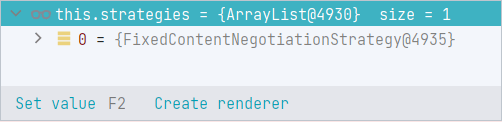
在 ContentNegotiationManager 的 resolveMediaTypes 方法中,可以看到 FixedContentNegotiationStrategy
添加默认的兜底的协商策略 - 配置 defaultContentType 属性
<mvc:annotation-driven content-negotiation-manager="contentNegotiationManager"/>
<bean id="contentNegotiationManager"
      class="org.springframework.web.accept.ContentNegotiationManagerFactoryBean">
<!--        <property name="favorPathExtension" value="false" />-->
    <property name="favorParameter" value="true"/>
<!--        <property name="parameterName" value="mediaType"/>-->
<!--        <property name="ignoreAcceptHeader" value="true" />-->
    <property name="defaultContentType" value="application/json" />
<!--        <property name="useJaf" value="false" />-->

    <property name="mediaTypes">
        <map>
            <entry key="json" value="application/json" />
            <entry key="xml" value="application/xml" />
        </map>
    </property>
</bean>
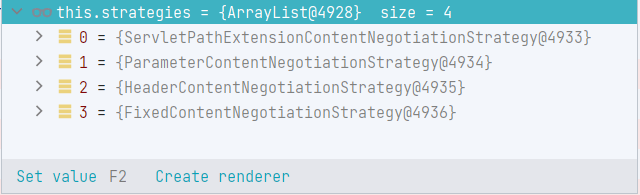
在 ContentNegotiationManager 的 resolveMediaTypes 方法中,可以看到排在最后的 FixedContentNegotiationStrategy,ContentNegotiationManagerFactoryBean#defaultNegotiationStrategy 的默认实现就是 FixedContentNegotiationStrategy
通过 Java 配置 - ContentNegotiationConfigurer
如果必须使用基于 url 的内容进行内容协商,使用查询参数(
ParameterContentNegotiationStrategy)比使用 URL 路径中最后的文件拓展名(PathExtensionContentNegotiationStrategy或者ServletPathExtensionContentNegotiationStrategy)更简单、更可取,因为后者可能导致 URI 变量、路径参数和 URI 解码问题。建议直接将 favorPathExtension 设置为 false,或者通过 strategies(List) 显式地设置协商策略来实现。其实官方已经开始陆续弃用
PathExtensionContentNegotiationStrategy和ServletPathExtensionContentNegotiationStrategy了,以后就用ParameterContentNegotiationStrategy吧。
ContentNegotiationConfigurer 可以认为是提供一个设置 ContentNegotiationManagerFactoryBean 的入口。ContentNegotiationConfigurer 的内容也很简单,实际上是将 ContentNegotiationManagerFactoryBean 中的各种配置方法包装一层,放到 ContentNegotiationConfigurer 中,最终也还是通过 ContentNegotiationManagerFactoryBean 来配置 ContentNegotiationManager。
ContentNegotiationManagerFactoryBean的源码分析请看本文的ContentNegotiationManagerFactoryBean小节。
public class ContentNegotiationConfigurer {

    // 最后还是委托给 ContentNegotiationManagerFactoryBean 来构建 ContentNegotiationManager
    private final ContentNegotiationManagerFactoryBean factory = new ContentNegotiationManagerFactoryBean();

    //  MediaType字符串到实际MediaType类型的映射
    private final Map<String, MediaType> mediaTypes = new HashMap<>();

    public ContentNegotiationConfigurer(@Nullable ServletContext servletContext) {
        if (servletContext != null) {
            this.factory.setServletContext(servletContext);
        }
    }

    .......
    // 将ContentNegotiationManagerFactoryBean中的各种配置方法包装一层,放到ContentNegotiationConfigurer中

    protected ContentNegotiationManager buildContentNegotiationManager() {
        this.factory.addMediaTypes(this.mediaTypes);
        return this.factory.build();
    }

}
ContentNegotiationConfigurer 中的所有可配置项,具体理解请结合 ContentNegotiationManagerFactoryBean 小节中记录的用于配置生产的 contentNegotiationManager 的字段。
-
defaultContentType或者defaultContentTypeStrategy:设置默认的兜底的ContentTypeStrategy实现 -
favorParameter:是否支持根据请求参数进行内容协商,即使用ParameterContentNegotiationStrategy,默认为 false,推荐设置为 true -
favorPathExtension:是否支持根据请求路径拓展名进行内容协商,即使用PathExtensionContentNegotiationStrategy或者ServletPathExtensionContentNegotiationStrategy,默认为 true,推荐设置为 false -
ignoreAcceptHeader:是否忽略请求中的 Accept 消息头,即是否不添加HeaderContentNegotiationStrategy,默认为 false,也就是添加,推荐设置为 true,也就是不添加 -
ignoreUnknownPathExtensions:是否忽略未知的 URL 后的文件拓展名(即请求中的文件拓展名找不到对应的 MediaType 的时候要不要报错),默认为 true,建议使用默认设置,主要用于PathExtensionContentNegotiationStrategy或者ServletPathExtensionContentNegotiationStrategy,和ParameterContentNegotiationStrategy。 -
mediaType和mediaTypes和replaceMediaTypes:维护文件拓展名到 MediaType 对象的映射,主要用于PathExtensionContentNegotiationStrategy或者ServletPathExtensionContentNegotiationStrategy,和ParameterContentNegotiationStrategy,mediaType 用于增加一个映射;mediaTypes 用于增加多个映射;replaceMediaTypes 用于替换所有映射,当我们需要进行特殊格式的文件拓展名的映射的时候,就需要调用这三个方法添加。 -
parameterName:根据请求参数进行内容协商的参数名称,用于ParameterContentNegotiationStrategy,默认为format,建议自定义修改。 -
strategies:其他属性配置全部作废,自己直接指定最终的内容协商策略列表,建议不修改此属性。 -
useJaf和useRegisteredExtensionsOnly:是否只使用 mediaTypes 中的映射,即,如果在 mediaTypes 中没有找到文件拓展名中对应的 MediaType,是否还要从默认的映射文件(/org/springframework/http/mime.types,此文件跟MediaTypeFactory在同一目录)中保存的映射关系中查找。默认为 null。主要用于PathExtensionContentNegotiationStrategy或者ServletPathExtensionContentNegotiationStrategy,和ParameterContentNegotiationStrategy。
WebMvcConfigurationSupport 通过 ContentNegotiationConfigurer 生成 ContentNegotiationManager,然后向容器内注册这个 Bean
WebMvcConfigurationSupport是@EnableWebMvc导进去的。
WebMvcConfigurationSupport#mvcContentNegotiationManager 方法:
@Bean
public ContentNegotiationManager mvcContentNegotiationManager() {
    if (this.contentNegotiationManager == null) {
        ContentNegotiationConfigurer configurer = new ContentNegotiationConfigurer(this.servletContext);
        configurer.mediaTypes(getDefaultMediaTypes());
        configureContentNegotiation(configurer);
        this.contentNegotiationManager = configurer.buildContentNegotiationManager();
    }
    return this.contentNegotiationManager;
}
关于此方法的解析,请看《SpringMVC- 第十篇:基于注解配置 SpringMVC.md》的 configureContentNegotiation 小节
实践
举个例子:
pom 中引入了解析 JSON 的第三方库
<!-- 处理JSON-->
<dependency>
    <groupId>com.fasterxml.jackson.core</groupId>
    <artifactId>jackson-databind</artifactId>
    <version>2.13.3</version>
</dependency>
控制器配置
@Configuration
@EnableWebMvc
public class WebMvcConfig extends WebMvcConfigurerAdapter {

    @Override
    public void configureContentNegotiation(ContentNegotiationConfigurer configurer) {
        configurer.defaultContentType(MediaType.APPLICATION_JSON).favorParameter(true).parameterName("myMediaType").favorPathExtension(false).ignoreAcceptHeader(true);
        // configurer 还可以通过修改 `mediaType`和`mediaTypes`和`replaceMediaTypes` 来添加(注册) 文件拓展名到 MediaType的映射关系
        WebMvcConfigurer.super.configureContentNegotiation(configurer);
    }

}
测试类
@SpringJUnitWebConfig(WebConfig.class)
class ContentNegotiationControllerTest {
    MockMvc mockMvc;

    @BeforeEach
    void setup(WebApplicationContext wac) {
        this.mockMvc = MockMvcBuilders.webAppContextSetup(wac).build();
    }

    @Test
    void getUser() throws Exception {
        mockMvc.perform(get("/ContentNegotiation/simpleUser").queryParam("myMediaType", "json")).andDo(print());
    }
}
ContentNegotiationManager#resolveMediaTypes 中,只有两个 ContentNegotiationStrategy 实例,同时 FixedContentNegotiationStrategy 排在 ParameterContentNegotiationStrategy 的后面
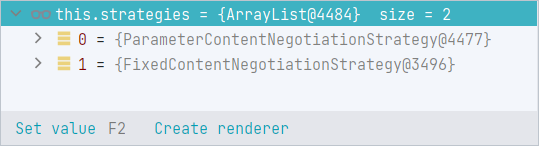
最终输出的日志
MockHttpServletRequest:
      HTTP Method = GET
      Request URI = /ContentNegotiation/simpleUser
       Parameters = {myMediaType=[json]}
          Headers = []
             Body = <no character encoding set>
    Session Attrs = {}

Handler:
             Type = xyz.xiashuo.springmvcannotationconfig.controller.ContentNegotiationController
           Method = xyz.xiashuo.springmvcannotationconfig.controller.ContentNegotiationController#getUser()

Async:
    Async started = false
     Async result = null

Resolved Exception:
             Type = null

ModelAndView:
        View name = null
             View = null
            Model = null

FlashMap:
       Attributes = null

MockHttpServletResponse:
           Status = 200
    Error message = null
          Headers = [Content-Type:"application/json"]
     Content type = application/json
             Body = {"name":"xiashuo","gender":"female","email":"[email protected]","age":20}
    Forwarded URL = null
   Redirected URL = null
          Cookies = []
添加文件拓展名到 MediaType 的映射关系
@Override
public void configureContentNegotiation(ContentNegotiationConfigurer configurer) {
    configurer.defaultContentType(MediaType.APPLICATION_JSON).favorParameter(true).parameterName("myMediaType").favorPathExtension(false).ignoreAcceptHeader(true);
    configurer.mediaType("str", MediaType.TEXT_PLAIN);
    WebMvcConfigurer.super.configureContentNegotiation(configurer);
}
添加控制器方法
@RequestMapping("/simpleUserStr")
public String getUserStr() {
    return new User("xiashuo", "female", "[email protected]", 20).toString();
}
测试方法
@Test
void getUserStr() throws Exception {
    mockMvc.perform(get("/ContentNegotiation/simpleUserStr").queryParam("myMediaType", "str")).andDo(print());
}
此时的依然只有两个 ContentNegotiationStrategy 实例,而且同时 FixedContentNegotiationStrategy 排在 ParameterContentNegotiationStrategy 的后面,
而此时的 HttpMessageConverter 的顺序是:
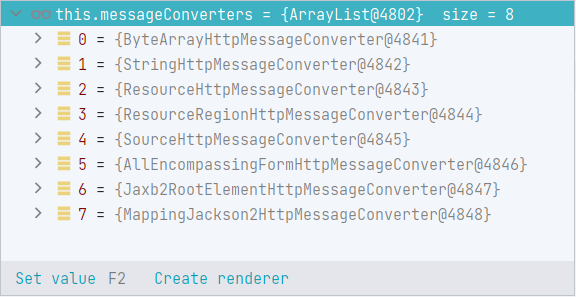
可以看到 MappingJackson2HttpMessageConverter 排在最后面,同时,MappingJackson2HttpMessageConverter 也是支持解析 String 类型的返回值的(在 canWrite 方法不指定 MediaType 类型的参数的时候),如果传入的 MediaType 是 json 类型的,那 MappingJackson2HttpMessageConverter 就可以转化返回值,但是此时 MediaType 是 text/plain,所以 MappingJackson2HttpMessageConverter 实际上无法处理,即,MappingJackson2HttpMessageConverter 无法将返回值转化成 application/json 和 application/*+json 以外的 MediaType。
所以只能 StringHttpMessageConverter 处理。转化成 text/plain 格式的 MediaType。
日志
MockHttpServletRequest:
      HTTP Method = GET
      Request URI = /ContentNegotiation/simpleUserStr
       Parameters = {myMediaType=[str]}
          Headers = []
             Body = <no character encoding set>
    Session Attrs = {}

Handler:
             Type = xyz.xiashuo.springmvcannotationconfig.controller.ContentNegotiationController
           Method = xyz.xiashuo.springmvcannotationconfig.controller.ContentNegotiationController#getUserStr()

Async:
    Async started = false
     Async result = null

Resolved Exception:
             Type = null

ModelAndView:
        View name = null
             View = null
            Model = null

FlashMap:
       Attributes = null

MockHttpServletResponse:
           Status = 200
    Error message = null
          Headers = [Content-Type:"text/plain;charset=ISO-8859-1", Content-Length:"61"]
     Content type = text/plain;charset=ISO-8859-1
             Body = User(name=xiashuo, gender=female, [email protected], age=20)
    Forwarded URL = null
   Redirected URL = null
          Cookies = []
注意,虽然在 WebInit extends AbstractAnnotationConfigDispatcherServletInitializer 中配置了过滤器,但是无法在测试类中生效,因此采用默认编码 ISO-8859-1。
HttpMessageConverter
没看完,先鸽了,以后有时间再研究,TODO
在通过注解配置 SpringMVC 的时候,默认的
HttpMessageConverter的初始化和自定义HttpMessageConverter的添加,请看《SpringMVC- 第十篇:基于注解配置 SpringMVC.md》的configureMessageConverters & extendMessageConverters小节。
我们在控制器方法的返回值配合
@ResponseBody注解进行内容协商的时候,HttpMessageConverter列表是从哪里来的呢?调用栈是这样的。首先我们在
WebMvcConfigurationSupport#requestMappingHandlerAdapter方法中构建RequestMappingHandlerAdapter的时候,会调用WebMvcConfigurationSupport#getMessageConverters方法获取我们全局配置的MessageConverter列表,设置到属性RequestMappingHandlerAdapter#messageConverters中,然后在RequestMappingHandlerAdapter的RequestMappingHandlerAdapter#afterPropertiesSet方法中调用RequestMappingHandlerAdapter#getDefaultReturnValueHandlers初始化返回值处理器的时候,会把RequestMappingHandlerAdapter#messageConverters设置到RequestResponseBodyMethodProcessor的构造方法参数中,设置到AbstractMessageConverterMethodArgumentResolver#messageConverters中(AbstractMessageConverterMethodArgumentResolver是RequestResponseBodyMethodProcessor父类的父类),然后在我们进行内容协商的时候,就会使用AbstractMessageConverterMethodArgumentResolver#messageConverters属性获取MessageConverter列表。
HttpMessageConverter 接口
HttpMessageConverter 其实是一个转换器接口,作用是将 HTTP 请求中特定 MediaType 类型的消息体转化成特定类型的类实例,或者是将特定类型的类实例转化为响应中特定的 MediaType 类型的消息体。
public interface HttpMessageConverter<T> {

    //  能否将 MediaType 类型的的消息体转化为 clazz类型的数据
    boolean canRead(Class<?> clazz, @Nullable MediaType mediaType);

    //  能否将 clazz类型的数据转化为 MediaType 类型的消息体
    boolean canWrite(Class<?> clazz, @Nullable MediaType mediaType);

    // 返回此 HttpMessageConverter 支持的所有类型的 MediaType
    List<MediaType> getSupportedMediaTypes();

    // 从(请求)消息体中读取出特定类型的数据
    T read(Class<? extends T> clazz, HttpInputMessage inputMessage) throws IOException, HttpMessageNotReadableException;

    // 将给定类型的值写入到响应的消息体中
    void write(T t, @Nullable MediaType contentType, HttpOutputMessage outputMessage) throws IOException, HttpMessageNotWritableException;

}
在分析 AbstractMessageConverterMethodProcessor 的 writeWithMessageConverters 方法(参数多的那个)的时候,我们知道系统中配置的 HttpMessageConverter 的顺序很重要
HttpMessageConverter 的实现类实在是太多,我们现在简单分析 WebMvcConfigurationSupport#addDefaultHttpMessageConverters 中添加的几种 HttpMessageConverter 的作用
AbstractHttpMessageConverter
AbstractHttpMessageConverter 是大多数 HttpMessageConverter 实现的抽象基类。这个基类通过 supportedMediaTypes 属性来保存支持的 MediaTypes 的。对 HttpMessageConverter#getSupportedMediaTypes 方法的实现就是返回 supportedMediaTypes 属性。
它还支持在写入响应的消息体的时候,设置响应的 Content-Type 和 Content-Length 消息头。
同时,AbstractHttpMessageConverter 在实现 HttpMessageConverter#canRead 和 HttpMessageConverter#canWrite 方法的时候有一个特点,就是不仅会参考当前的目标 MediaType,还会参考待转化的实例的类型。
@Override
public boolean canRead(Class<?> clazz, @Nullable MediaType mediaType) {
    // 例如 是否支持将 mediaType 类型的请求的消息体转化为 clazz 类型的控制器方法参数
    return supports(clazz) && canRead(mediaType);
}

@Override
public boolean canWrite(Class<?> clazz, @Nullable MediaType mediaType) {
    // 是否支持将 clazz 类型的返回值转化为 mediaType 类型的消息体
    return supports(clazz) && canWrite(mediaType);
}
其中 AbstractHttpMessageConverter#supports 方法由各子类根据自身能力进行实现。
GenericHttpMessageConverter 接口
继承 HttpMessageConverter 接口,是 HttpMessageConverter 的特化功能的子接口,可以将 HTTP 请求转换为指定泛型类型的目标对象,并将指定泛型类型的源对象转换为 HTTP 响应。
public interface GenericHttpMessageConverter<T> extends HttpMessageConverter<T> {

    // 能否将 MediaType 类型的的消息体转化为 type 类型的数据
    // type一般为泛型泛型类型,contextClass一般为此泛型类型在上下文(即实际场景,比如泛型类型在方法签名中的类型)中的具体类型
    // 执行跟 HttpMessageConverter#canRead(Class, MediaType) 一样的检查
    boolean canRead(Type type, @Nullable Class<?> contextClass, @Nullable MediaType mediaType);

    // 从(请求)消息体中读取出特定类型的数据
    // type 为返回的类型,一般为泛型泛型类型,contextClass一般为此泛型类型在上下文(即实际场景,比如泛型类型在方法签名中的类型)中的具体类型
    T read(Type type, @Nullable Class<?> contextClass, HttpInputMessage inputMessage)
            throws IOException, HttpMessageNotReadableException;

    //  能否将 clazz类型的数据转化为 MediaType 类型的消息体
    // type一般为泛型泛型类型,clazz 为源对象的实际类型
    // 执行跟 HttpMessageConverter#canWrite(Class, MediaType) 一样的检查
    boolean canWrite(@Nullable Type type, Class<?> clazz, @Nullable MediaType mediaType);

    // 将给定类型的值写入到响应的消息体中
    void write(T t, @Nullable Type type, @Nullable MediaType contentType, HttpOutputMessage outputMessage)
            throws IOException, HttpMessageNotWritableException;

}
主要应用场景
HttpMessageConverter 不仅用在返回值处理中,也用在请求参数解析中。
详细请看《SpringMVC-RequestMappingHandlerAdapter 源码解析.md》的 RequestResponseBodyMethodProcessor 小节
ByteArrayHttpMessageConverter
只能处理字节数组类型 byte[] 的对象到任意 MediaType 的转化,即从 HTTP 请求中 application/octet-stream 或者 */* 类型的 MediaType 类型的消息体中转化成字节数组,或者是将字节数组的值转化为响应中 application/octet-stream 或者 */* 类型的 MediaType 类型的消息体。
源码分析 - 略
实践
当我们的控制器方法被 @ResponseBody 注解修饰,同时的返回值类型是 String 的时候,此 HttpMessageConverter 就会生效
略
StringHttpMessageConverter
只能处理字符串类型 String 的对象到任意 MediaType 的转化,即从 HTTP 请求中 text/plain 或者 */* 类型的 MediaType 类型的消息体中转化成字符串,或者是将字符串类型的值转化为响应中 text/plain 或者 */* 类型的 MediaType 类型的消息体。
支持指定字符串的编码格式,默认的编码格式是 ISO-8859-1
源码分析 - 略
实践
当我们的控制器方法被 @ResponseBody 注解修饰,同时的返回值类型是 String 的时候,此 HttpMessageConverter 就会生效
略
ResourceHttpMessageConverter
Resource接口相关的知识,请看《Spring 中的资源获取.md》
只能处理 Resource 类型的对象到任意 MediaType 的转化,即从 HTTP 请求中 */*(任意类型)的 MediaType 类型的消息体中转化成 Resource 类型的值,或者是将 Resource 类型的值转化为响应中 */*(任意类型)的 MediaType 类型的消息体。
支持自定义是否支持读取流 supportsReadStreaming,默认为 true
ResourceHttpMessageConverter 的源码分析就懒得做了,很简单,ResourceHttpMessageConverter 的 writeInternal 方法,实际上就是将资源的流写入响应的消息体中,很简单,跟之前在《SpringMVC- 第三篇:在控制器方法中获取请求参数和构建响应.md》中的 上传下载 小节的下载的做法其实是一样的。
实践
当我们的控制器方法被 @ResponseBody 注解修饰,同时的返回值类型是 Resource 的时候,此 HttpMessageConverter 就会生效
ResourceHttpMessageConverter 是 SpringMVC 中进行文件下载的最快捷的方式
我们在《SpringMVC- 第三篇:在控制器方法中获取请求参数和构建响应.md》中的
上传下载小节就学习过如何在 Spring 中进行上传下载,但是下载还是不如直接使用ResourceHttpMessageConverter来的优雅
控制器方法
@RequestMapping("/resourceDownload")
@ResponseBody
public Resource download(HttpServletResponse response) {
    ResourceLoader loader = new DefaultResourceLoader();
    // 获取资源
    Resource resource = loader.getResource("1111.txt");
    // 重点,必须设置,不然浏览器无法识别为文件下载。
    response.setHeader("Content-Disposition", "attachment;filename="+resource.getFilename());
    return resource;
}
在 src\main\resources 路径下添加待下载文件 1111.txt,内容如下
aaaaaaaaaaaaaaaaaaa
bbbbbbbbbbbbbbbbbb
cccccccccccccccccc
然后在浏览器中访问 http://localhost:8080/SpringMVC_ContentNegotiation/ContentNegotiation/resourceDownload,可以看到文件正常下载,我们打断点分析一下这个过程。
protected <T> void writeWithMessageConverters(@Nullable T value, MethodParameter returnType, ServletServerHttpRequest inputMessage, ServletServerHttpResponse outputMessage) throws IOException, HttpMediaTypeNotAcceptableException, HttpMessageNotWritableException {

    ........

    if (selectedMediaType != null) {
        // 此时我们发起请求的时候是没有指定我们想要什么MediaType的,因此,此时最终得出的 selectedMediaType 是什么类型其实我们并不在意
        selectedMediaType = selectedMediaType.removeQualityValue();
        for (HttpMessageConverter<?> converter : this.messageConverters) {
            GenericHttpMessageConverter genericConverter = (converter instanceof GenericHttpMessageConverter ? (GenericHttpMessageConverter<?>) converter : null);
            // 遍历所有的 HttpMessageConverter 并开始通过 converter的canWrite判断当前converter是否可以处理当前返回值,
            // 这里要注意,根据 messageConverters 的顺序,先遍历 ByteArrayHttpMessageConverter 、再遍历 StringHttpMessageConverter 、然后到 ResourceHttpMessageConverter
            // 因为 ByteArrayHttpMessageConverter支持子字节数组类型的实例,StringHttpMessageConverter 只支持字符串类型的实例,所以他们都会跳过,
            // 而 ResourceHttpMessageConverter 刚好支持 Resource 类型的实例,同时支持任意 MediaType,所以最终生效的一定是 ResourceHttpMessageConverter
            if (genericConverter != null ? ((GenericHttpMessageConverter) converter).canWrite(targetType, valueType, selectedMediaType) : converter.canWrite(valueType, selectedMediaType)) {
                body = getAdvice().beforeBodyWrite(body, returnType, selectedMediaType,
                        (Class<? extends HttpMessageConverter<?>>) converter.getClass(),
                        inputMessage, outputMessage);
                if (body != null) {
                    Object theBody = body;
                    LogFormatUtils.traceDebug(logger, traceOn -> "Writing [" + LogFormatUtils.formatValue(theBody, !traceOn) + "]");
                    // 设置 Content-Disposition 头,用的不多,一般都是手动设置
                    addContentDispositionHeader(inputMessage, outputMessage);
                    if (genericConverter != null) {
                        genericConverter.write(body, targetType, selectedMediaType, outputMessage);
                    }
                    else {
                        // 最终还是调用 ResourceHttpMessageConverter 的 write方法来写入响应的消息体
                        ((HttpMessageConverter) converter).write(body, selectedMediaType, outputMessage);
                    }
                }
                else {
                    if (logger.isDebugEnabled()) {
                        logger.debug("Nothing to write: null body");
                    }
                }
                return;
            }
        }
    }

    ........

}
PS,虽然内容协商源码中 AbstractMessageConverterMethodProcessor#writeWithMessageConverters 方法里有 isResourceType 方法的判断分支对 Resource 类型的返回值进行特殊处理,但是那应该不是用于文件下载的,而且要进入这个分支,请求的消息头必须包含 Range。
ResourceRegionHttpMessageConverter
继承 AbstractGenericHttpMessageConverter,有点复杂,以后再尝试分析
源码分析 - 略
实践
略
SourceHttpMessageConverter
只能支持处理 DOMSource、SAXSource、StAXSource、StreamSource、Source 类型(大部分都是 Source 接口的子类)的对象到 MediaType 为 MediaType.APPLICATION_XML, MediaType.TEXT_XML, new MediaType("application", "*+xml") 的转化。
主要用于解析 XML 类型的 MediaType
源码分析 - 略
实践
当我们的控制器方法被 @ResponseBody 注解修饰,同时的返回值类型是 DOMSource、SAXSource、StAXSource、StreamSource、Source,同时客户端请求的类型是 MediaType.APPLICATION_XML, MediaType.TEXT_XML, new MediaType("application", "*+xml") 的时候,此 HttpMessageConverter 就会生效。
略
AllEncompassingFormHttpMessageConverter
继承自 FormHttpMessageConverter,这个就牛逼了,核心还是 FormHttpMessageConverter,AllEncompassingFormHttpMessageConverter 支持添加了对 XML 和 JSON 的支持
重点看 FormHttpMessageConverter
实现 HttpMessageConverter 来读写常规的 HTML 表单,也可以写入 (但不读取)MultiValueMap<String, ?> 类型的数据 (例如文件上传)。
同时还使用多种其他 HttpMessageConverter 实现类来实现多种类型的数据的转化
源码分析 - 略
实践
略
Jaxb2RootElementHttpMessageConverter
可以使用 JAXB2 读写 XML 的 HttpMessageConverter 实现。
该转换器可以读取用 XMLrootelement 和 XMLType 注解修饰的类,并编写带有 XMLrootelement 或其子类注释的类。
主要用来处理 XML
源码分析 - 略
实践
略
MappingJackson2HttpMessageConverter
支持任意类型的对象到 MediaType.APPLICATION_JSON 和 application/*+json 这两种 MediaType 的之间转化,
supports 方法继承自
AbstractGenericHttpMessageConverter,始终返回 true,表示支持任意类型的对象
源码分析 - 略
实践
当我们的控制器方法被 @ResponseBody 注解修饰,同时的返回值类型是排在前面的 HttpMessageConverter 处理不了的类型(大部分时候都是用户的自定义类型),且目标 MediaType 是 MediaType.APPLICATION_JSON 和 application/*+json 这两种 MediaType 的时候,此 HttpMessageConverter 就会生效。
这也是我们前面实践过的场景。
略
MappingJackson2XmlHttpMessageConverter
支持任意类型的对象到 application/xml、text/xml 和 application/*+xml 这三种 MediaType 的之间转化,
supports 方法继承自
AbstractGenericHttpMessageConverter,始终返回 true,表示支持任意类型的对象
源码分析 - 略
实践
当我们的控制器方法被 @ResponseBody 注解修饰,同时的返回值类型是排在前面的 HttpMessageConverter 处理不了的类型(大部分时候都是用户的自定义类型),且目标 MediaType 是 application/xml、text/xml 和 application/*+xml 这三种 MediaType 的时候,此 HttpMessageConverter 就会生效。
这也是我们前面实践过的场景。
略
自定义 MediaType+ 自定义 MessageConverter
自定义内容协商的要素:
-
自定义文件拓展名与自定义
MediaType的映射在实现
WebMvcConfigurer的 Web 配置类中,重写configureContentNegotiation方法,通过ContentNegotiationConfigurer来添加(注册)自定义文件拓展名和MediaType的映射关系具体请参考《SpringMVC- 第十篇:基于注解配置 SpringMVC.md》的
configureContentNegotiation小节 -
自定义 MessageConverter 处理特定控制器方法的返回值类型到自定义 MediaType 的转化,即自定义
MessageConverter参考《SpringMVC- 第十篇:基于注解配置 SpringMVC.md》的
configureMessageConverters & extendMessageConverters小节
实践
首先添加自定义消息类型,XiaShuoMessage
@Data
public class XiaShuoMessage {

    private String name;
    private int age;
    private String info;

}
然后添加只能处理 XiaShuoMessage 类型的实例到 application/xs(自定义 MediaType)之间转化的 HttpMessageConverter:XiaShuoMessageConverter(且还未支持读操作)。
/**
 * 参考 StringHttpMessageConverter
 * 仅支持 `XiaShuoMessage`类型的实例到`application/xs`(自定义`MediaType`)之间转化
 * 且还未支持读操作
 */
public class XiaShuoMessageConverter extends AbstractHttpMessageConverter<XiaShuoMessage> {
    // 默认编码
    public static final Charset DEFAULT_CHARSET = StandardCharsets.UTF_8;

    public XiaShuoMessageConverter() {
        // 仅支持 "application/xs" 类型的MediaType
        super(DEFAULT_CHARSET, MediaType.valueOf("application/xs"));
    }

    @Override
    protected boolean supports(Class<?> clazz) {
        // 只支持处理 XiaShuoMessage 类型的实例
        return XiaShuoMessage.class.isAssignableFrom(clazz);
    }

    @Override
    protected XiaShuoMessage readInternal(Class<? extends XiaShuoMessage> clazz, HttpInputMessage inputMessage) throws IOException, HttpMessageNotReadableException {
        // 读操作有待实现
        return null;
    }

    @Override
    protected void writeInternal(XiaShuoMessage xiaShuoMessage, HttpOutputMessage outputMessage) throws IOException, HttpMessageNotWritableException {
        String content = myProtocolContent(xiaShuoMessage);
        // 输出到响应的消息体
        StreamUtils.copy(content, DEFAULT_CHARSET, outputMessage.getBody());
    }

    /**
     * 自定义消息输出内容格式
     * @param xiaShuoMessage
     * @return
     */
    private String myProtocolContent(XiaShuoMessage xiaShuoMessage){
        // 当然你可以在这里选择其他的拼接方式,比如把所有的属性用英文逗号拼接,等等。
        return xiaShuoMessage.toString();
    }

    @Override
    protected void addDefaultHeaders(HttpHeaders headers, XiaShuoMessage s, @Nullable MediaType type) throws IOException {
        // 不重写 addDefaultHeaders 指定响应的 ContentType 消息头的话,默认的addDefaultHeaders会自动设置 ContentType 为自定义 MediaType :application/xs;charset=UTF-8,
        // 浏览器会处理不了,会变成下载,所以这里需要设置ContentType 消息头,设置成 MediaType.TEXT_PLAIN 是为了方便展示
        // 指定类型的时候指定编码
        headers.setContentType(new MediaType(MediaType.TEXT_PLAIN, DEFAULT_CHARSET));
        super.addDefaultHeaders(headers, s, type);
    }

    @Override
    protected Long getContentLength(XiaShuoMessage message, @Nullable MediaType contentType) {
        String str = myProtocolContent(message);
        return (long) str.getBytes(DEFAULT_CHARSET).length;
    }

}
在实现了 WebMvcConfigurer 接口的 Web 配置类中重写 configureContentNegotiation 和 extendMessageConverters 方法,
其中,为了支持请求路径扩展名(ServletPathExtensionContentNegotiationStrategy)和请求参数(ParameterContentNegotiationStrategy)的内容协商,我们最好添加自定义的 MediaType 到文件拓展名的映射,如果只是使用基于 Accept 请求头进行内容协商,则不需要添加 MediaType 到文件拓展名的映射。
@Override
public void configureContentNegotiation(ContentNegotiationConfigurer configurer) {
    // 设置默认的 ContentType 为 MediaType.APPLICATION_JSON
    // 支持请求参数内容协商,且设置内容协商参数为 _f
    // 禁用使用请求路径拓展名进行内容协商
    // 禁用使用Accept请求头进行内容协商
    configurer.defaultContentType(MediaType.APPLICATION_JSON).favorParameter(true).parameterName("_f").favorPathExtension(false).ignoreAcceptHeader(true);
    // 注册 自定义MediaType和文件拓展名的映射
    configurer.mediaType("xs", MediaType.valueOf("application/xs"));
    WebMvcConfigurer.super.configureContentNegotiation(configurer);
}

@Override
public void extendMessageConverters(List<HttpMessageConverter<?>> converters) {
    // 添加自定义的 HttpMessageConverter
    // 此时 XiaShuoMessageConverter 处于 HttpMessageConverter 列表的最末尾,当然也就处在 MappingJackson2HttpMessageConverter 的后面
    converters.add(new XiaShuoMessageConverter());
    WebMvcConfigurer.super.extendMessageConverters(converters);
}
创建控制器方法来测试内容协商
@RestController
@RequestMapping("/ContentNegotiation")
public class ContentNegotiationController {

    /**
     * 能处理 XiaShuoMessage 类型返回值且将其转化为 application/xs 类型的 MediaType 的只有 XiaShuoMessageConverter
     */
    @RequestMapping("/XiaShuo")
    public XiaShuoMessage getXiaShuoMessage() {
        XiaShuoMessage xiaShuoMessage = new XiaShuoMessage();
        xiaShuoMessage.setName("xiashuo");
        xiaShuoMessage.setAge(20);
        xiaShuoMessage.setInfo("这是我的自定义的协议");
        return xiaShuoMessage;
    }

}
访问 http://localhost:8080/SpringMVC_AnnotationConfig/ContentNegotiation/XiaShuo?_f=xs,返回

访问 http://localhost:8080/SpringMVC_AnnotationConfig/ContentNegotiation/XiaShuo?_f=json,返回
