Spring 中的资源获取
Spring 中的资源获取
参考博客
SpringBoot--本地文件_51CTO博客_springboot下载文件到本地
Spring Resource和ResourceLoader源码解析_nju.拈花的博客-CSDN博客
【小家Spring】资源访问利器---Spring提供的Resource接口以及它的常用子类源码分析_方向盘(YourBatman)的博客-CSDN博客
简单的源码分析
Resource
全包名是 org.springframework.core.io.Resource
Resource 继承 InputStreamSource 接口
InputStreamSource接口也是 Spring 定义的,全包名为org.springframework.core.io.InputStreamSource,用于描述一个可以作为InputStream的源的对象。
从底层资源 (如文件或类路径资源) 的实际类型进行抽象,得出的顶层的资源描述接口,即:Resource 是对多种不同资源的一个统一封装。如果资源物理存在,则可以为这个资源打开 InputStream 读取流,但对于某些类型的资源只能返回 URL 或 File 对象。实际的行为是特定于实现的。
关于文件或类路径资源介绍,参考《Java 中的常见路径和资源获取.md》
Resource 接口中几个比较常用方法
-
getInputStream(),继承自
InputStreamSource接口,定位并且打开当前资源,返回该资源的一个InputStream。每次调用都会返回一个新的InputStream。 -
exists(),返回该资源是否物理存在,常用,每个实现都会有自己的检查方法。每次使用
Resource资源之前都应该调用此方法检查一下 -
getURL(),返回该资源的 URL 句柄。
-
getURI(),返回该资源的 URI 句柄。
-
isFile(),是否是文件。
-
getFile(),如果是文件,则返回该资源的 File 句柄。
Resource 的默认实现如下:

其中最常用的,还是 AbstractResource 这个分支下的类,比如 UrlResource,FileUrlResource,ClassPathResource,FileSystemResource,这个我们接下来细研究其使用。
AbstractResource
Resource 接口实现的基础抽象类,包含了一些预先实现的典型的行为,比如
-
exists方法会先检查是不是文件(isFile方法),如果是文件则判断文件存不存在,如果不是文件,则看看能不能打开InputStream -
isOpen方法始终返回 false -
getFile和getURL默认报错,子类必须重写 -
toString方法返回getDescription方法的内容 -
...
AbstractFileResolvingResource
继承 AbstractResource,主要用于将 URL 解析为 File 对象的资源,例如 UrlResource 或 ClassPathResource。
根据 URL 的协议,比如 file: 协议,vfs: 协议,将资源进行相应的解析,
在 ResourceUtils 中具体的支持的解析协议,
-
URL_PROTOCOL_FILE:file -
URL_PROTOCOL_VFS:vfs -
URL_PROTOCOL_VFSFILE:vfsfile -
URL_PROTOCOL_VFSZIP:vfszip -
URL_PROTOCOL_JAR:jar -
URL_PROTOCOL_WAR:war -
URL_PROTOCOL_ZIP:zip -
URL_PROTOCOL_WSJAR:wsjar
ResourceUtils 我们后面会经常用到,是资源处理的常用工具类。
重点看看 exists 方法的实现,UrlResource 和 FileUrlResource 都继承了这个方法来判断资源是否存在,ClassPathResource 则是重写了这个方法
每次使用
Resource资源之前都应该调用exists方法检查一下
@Override
public boolean exists() {
    try {
        // 获取资源的URL
        URL url = getURL();
        // 如果URL指向的是文件系统下的资源,直接判断文件是否存在即可
        if (ResourceUtils.isFileURL(url)) {
            // Proceed with file system resolution
            return getFile().exists();
        }
        else {
            // 如果URL指向的是常规的HTTP地址,则直接发起一个请求,看响应结果
            // Try a URL connection content-length header
            URLConnection con = url.openConnection();
            customizeConnection(con);
            HttpURLConnection httpCon = (con instanceof HttpURLConnection ? (HttpURLConnection) con : null);
            if (httpCon != null) {
                // HTTP方法为 HEAD,只获取响应头信息
                httpCon.setRequestMethod("HEAD");
                // 检查响应,看是不是通的
                int code = httpCon.getResponseCode();
                if (code == HttpURLConnection.HTTP_OK) {
                    return true;
                }
                else if (code == HttpURLConnection.HTTP_NOT_FOUND) {
                    return false;
                }
            }
            if (con.getContentLengthLong() > 0) {
                return true;
            }
            if (httpCon != null) {
                // No HTTP OK status, and no content-length header: give up
                httpCon.disconnect();
                return false;
            } else {
                // Fall back to stream existence: can we open the stream?
                getInputStream().close();
                return true;
            }
        }
    }
    catch (IOException ex) {
        return false;
    }
}
UrlResource
继承 AbstractFileResolvingResource,这是对 java.net.URL 资源定位器(比如我们常见的 HTTP 的 URL 地址)的 Resource 封装,支持解析为 URL 对象(UrlResource#url),然后直接用 URL 对象的输入流来当作资源的输入流,因此可以用来访问 URL 对象本身可以正常访问的任意对象,因此,它支持 http、https、file、ftp、jar 等协议。其 getInputStream() 方法实现如下:
@Override
public InputStream getInputStream() throws IOException {
    URLConnection con = this.url.openConnection();
    customizeConnection(con);
    try {
        // 直接返回内部的URL对象的输入流
        return con.getInputStream();
    }
    catch (IOException ex) {
        // Close the HTTP connection (if applicable).
        if (con instanceof HttpURLConnection) {
            ((HttpURLConnection) con).disconnect();
        }
        throw ex;
    }
}
当使用 file: 协议的时候,也可以解析为 File 对象。此时我们可以使用其子类 FileUrlResource
UrlResource 支持各种方式构造:
-
直接使用
URL实例 -
直接使用
URI实例 -
使用一个完整的包含协议、域名、访问路径的 URL 字符串,具体例子直接看实践部分
-
分别指定协议、域名和访问路径组成的地址、页面内容块(url 中
#开头的),本质上还是通过这些信息构建一个 URL 实例然后进行初始化。解释一下页面内容块,比如 Spring 官方文档的路径:https://docs.spring.io/spring-framework/docs/5.2.22.RELEASE/spring-framework-reference/core.html#beans-definition 文档是一个单页应用,包含了所有的章节,在 URL 后面以
#开头带上我们想定位的章节,打开 URL 链接的时候就会自动跳到对应的章节
实践
经过 UrlResource 的封装,只要知道一个 HTTP 连接或者一个 FTP 链接,就可以直接通过 URL 路径获取 URL 资源,真的非常方便,
UrlResource 可以用来判断 URL 是否能通
public static void main(String[] args) throws IOException {
    //SpringApplication.run(ResourceApplication.class, args);
    // 直接通过URL路径获取URL资源
    UrlResource urlResource = new UrlResource("http://www.baidu.com");
    boolean pageExists = urlResource.exists();
    System.out.println(pageExists);
    if (pageExists) {
        //如果页面存在,直接通过输入流获取页面的内容
        InputStream webPage = urlResource.getInputStream();
        StringBuilder sb = new StringBuilder();
        int len = -1;
        byte[] buff = new byte[1024];
        while ((len = webPage.read(buff)) > 0) {
            String data = new String(buff, 0, len);
            sb.append(data);
        }
        System.out.println(sb);
        // 流用完了一定要关闭
        webPage.close();
    }
    // UrlResource 可以用来判断URL是否能通
    UrlResource blogPage = new UrlResource("https://xiashuo.xyz/");
    boolean blogExists = blogPage.exists();
    System.out.println(blogExists);
}
FileUrlResource
UrlResource 的子类,主要用于进行将 URL 解析成文件(File 实例)时的工作,而且通过实现 WritableResource 接口,可以提供 URL 对应的文件的 getOutputStream,方便用户对文件进行修改。此外,没有重写 UrlResource 的 getInputStream 的方法。
这是 DefaultResourceLoader 在解析 URL 路径为 file:… 的资源时使用的资源类。而且因为 FileUrlResource 实现了 WritableResource,所以允许进行类型转化,转换为 WritableResource 类型。
而当我们需要直接从 File 实例或 NIO 的 Path 实例构造资源对象时,请直接使用 FileSystemResource,这个我们后面会提到。
此外,FileUrlResource 提供了两种构建方式,
-
直接使用
URL实例 -
调用父类
UrlResource的构造函数,通过指定协议(ResourceUtils.URL_PROTOCOL_FILE也就是file)和路径名来构建,最终构建的是一个 URL 为file:...的资源,用户在构建FileUrlResource时不需要再传入的路径中就不需要再写file:,见下面的实践部分
实践
注意相对路径的起点是当前应用的工作目录。
修改当前 main 方法的 Run/Debug configuration 的 Working Directory 为当前模块的根路径,如果不设置,默认的工作目录是当前模块所在的项目的根路径
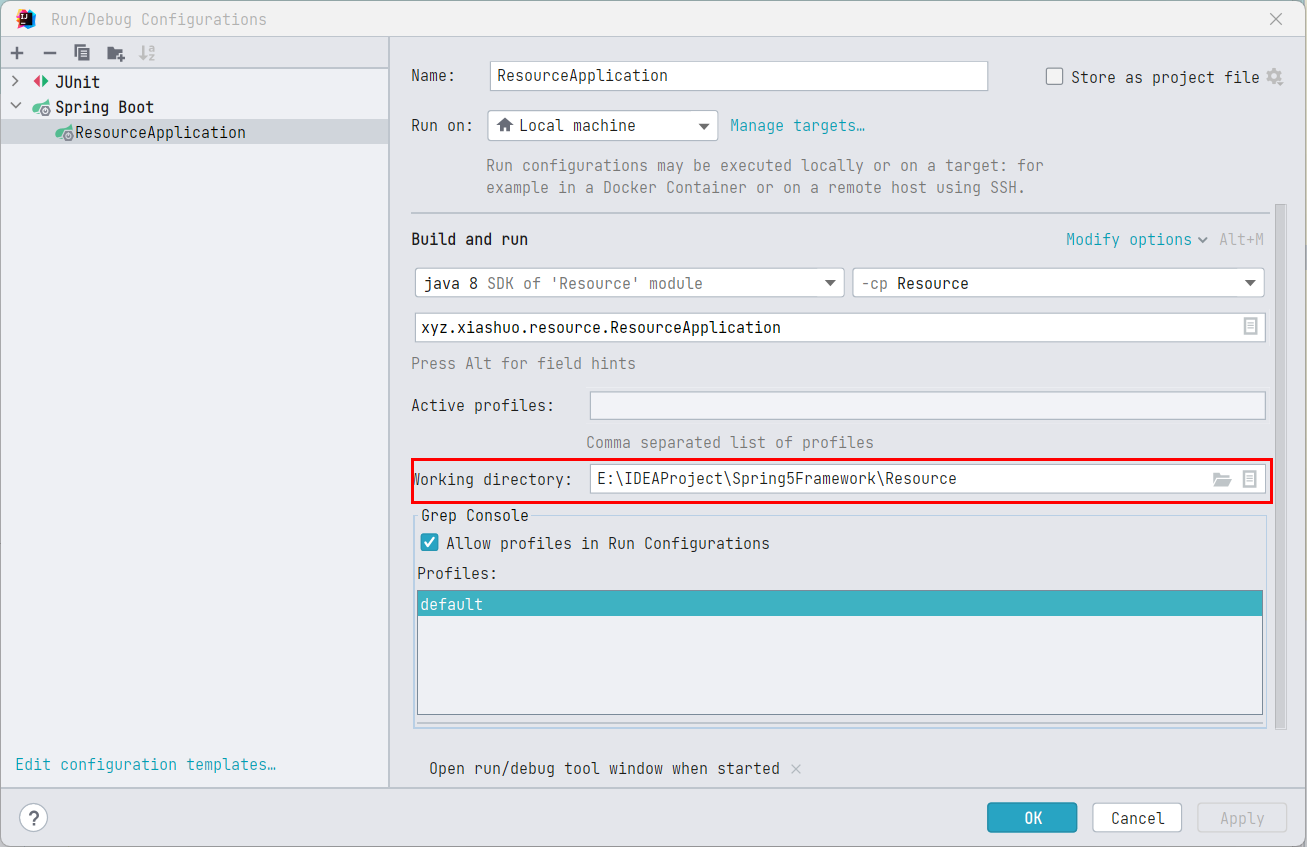
在工作目录也就是当前模块的根路径下创建文件 config.properties,不写入任何内容,空着
执行 main 方法
public static void main(String[] args) throws IOException {
    // 路径不需要带前缀 file:
    FileUrlResource fileUrlResource = new FileUrlResource("./config.properties");
    boolean fileExists = fileUrlResource.exists();
    if (fileExists) {
        System.out.println(fileUrlResource.getFile().getCanonicalFile());
        OutputStream outputStream = fileUrlResource.getOutputStream();
        OutputStreamWriter outputStreamWriter = new OutputStreamWriter(outputStream);
        outputStreamWriter.write("application.name = ResourceTest");
        outputStreamWriter.flush();
        // 流用完了一定要关闭
        outputStreamWriter.close();
        outputStream.close();
    }

}
写入之后,文件内容为
application.name = ResourceTest
ClassPathResource
继承 AbstractFileResolvingResource,这是类路径下的资源的 Resource 实现。
可使用给定的 ClassLoader 或给定的 Class 来加载资源。如果类路径资源位于文件系统中,则支持将其解析为 java.io.File,但对于类路径中的第三方 jar 包中的资源,通过 ClassPathResource 依然可以获取,但是无法将其转化为 java.io.File 对象。即 getFile() 返回 null
通过
ClassLoader和Class来加载类路径下的资源的实践,我们在《Java 中的常见路径和资源获取.md》中尝试过
构造函数:
-
同时指定路径字符串、类加载器和 Class 实例
-
只指定路径字符串和类加载器
-
只指定路径字符串和 Class 实例
-
只指定路径,使用当前进程绑定的默认的类加载器
ClassUtils.getDefaultClassLoader()
值得注意的是在只指定路径字符串和类加载器的时候,如果路径字符串的第一个字符是 /,则去掉,因为使用类加载器获取资源的时候,以 / 开头会返回 null,这个我们在《Java 中的常见路径和资源获取.md》中都证实过。Spring 帮我们屏蔽了这个问题。
public ClassPathResource(String path, @Nullable ClassLoader classLoader) {
    Assert.notNull(path, "Path must not be null");
    String pathToUse = StringUtils.cleanPath(path);
    // 使用类加载器获取资源的时候,以`/`开头的路径会返回null,这个我们在《Java中的常见路径和资源获取.md》中都证实过。Spring帮我们屏蔽了这个问题。
    if (pathToUse.startsWith("/")) {
        pathToUse = pathToUse.substring(1);
    }
    this.path = pathToUse;
    this.classLoader = (classLoader != null ? classLoader : ClassUtils.getDefaultClassLoader());
}
将路径字符串解析为 URL 和通过路径字符串获取资源的时候,默认先用 Class 实例进行操作,然后再用类加载器。注意这一点
@Nullable
protected URL resolveURL() {
    try {
        if (this.clazz != null) {
            return this.clazz.getResource(this.path);
        }
        else if (this.classLoader != null) {
            return this.classLoader.getResource(this.path);
        }
        else {
            return ClassLoader.getSystemResource(this.path);
        }
    }
    catch (IllegalArgumentException ex) {
        // Should not happen according to the JDK's contract:
        // see https://github.com/openjdk/jdk/pull/2662
        return null;
    }
}
@Override
public InputStream getInputStream() throws IOException {
    InputStream is;
    if (this.clazz != null) {
        is = this.clazz.getResourceAsStream(this.path);
    }
    else if (this.classLoader != null) {
        is = this.classLoader.getResourceAsStream(this.path);
    }
    else {
        is = ClassLoader.getSystemResourceAsStream(this.path);
    }
    if (is == null) {
        throw new FileNotFoundException(getDescription() + " cannot be opened because it does not exist");
    }
    return is;
}
可以看到,ClassPathResource 对 getInputStream 的实现,都是委托给了 Clazz.getResource 和 ClassLoader.getResource。
通过
ClassLoader和Class来加载类路径下的资源的实践,我们在《Java 中的常见路径和资源获取.md》中尝试过。
实践
在 src\main\resources 下的 application.properties 中编辑内容
spring.application.name=xiashuoDemo
然后编写测试类
public static void main(String[] args) throws IOException {
    ClassPathResource resource = new ClassPathResource("application.properties");
    // 可以将获取到的资源转化为Fiel对象
    File file1 = resource.getFile();
    System.out.println(file1.getCanonicalPath());
    boolean exists = resource.exists();
    System.out.println(exists);
    if (exists) {
        //如果页面存在,直接通过输入流获取页面的内容
        InputStream file = resource.getInputStream();
        StringBuilder sb = new StringBuilder();
        int len = -1;
        byte[] buff = new byte[1024];
        while ((len = file.read(buff)) > 0) {
            String data = new String(buff, 0, len);
            sb.append(data);
        }
        System.out.println(sb);
        // 流用完了一定要关闭
        file.close();
    }
    // --- 获取第三方jar包中的资源 虽然获取的是乱码,但是是可以获取的
    ClassPathResource thirdPartyJarSource = new ClassPathResource("org/springframework/asm/AnnotationWriter.class");
    // 无法将获取到的资源转化为Fiel对象
    //File file2 = thirdPartyJarSource.getFile();
    //System.out.println(file2.getCanonicalPath());
    boolean thirdPartyJarSourceExists = thirdPartyJarSource.exists();
    System.out.println(thirdPartyJarSourceExists);
    if (thirdPartyJarSourceExists) {
        //如果页面存在,直接通过输入流获取页面的内容
        InputStream classFile = thirdPartyJarSource.getInputStream();
        StringBuilder sb = new StringBuilder();
        int len = -1;
        byte[] buff = new byte[1024];
        while ((len = classFile.read(buff)) > 0) {
            String data = new String(buff, 0, len);
            sb.append(data);
        }
        System.out.println(sb);
        // 流用完了一定要关闭
        classFile.close();
    }
}
可以正常输出
E:\IDEAProject\Spring5Framework\Resource\target\classes\application.properties
true
spring.application.name=xiashuoDemo
true
省略乱码
FileSystemResource
继承 AbstractResource,跟 FileUrlResource 类似,不过 FileUrlResource 是基于 URL 的,而 FileSystemResource 是之间基于 File 和 Path。主要以 NIO 的方式提供流
这是对 java.io.File 和 java.nio.file.Path 的 Resource 封装,对应着一个文件系统中的一个文件,支持解析为 File 和 URL,实现的 WritableResource 接口。
FileUrlResource也实现了WritableResource接口。我感觉
FileSystemResource得使用,是没有UrlResource的使用广泛的
构造函数:
-
直接提供
File实例 -
直接提供
Path实例 -
指定
FileSystem,同时提供路径字符串 -
只提供路径字符串,构造方法会根据此路径字符串,构造
File对象,再根据File对象,构造Path对象
对 getInputStream 和 getOutputStream,都是直接传入 Path 打开 NIO 流。可以看到,FileSystemResource 是基于 NIO 的。
@Override
public OutputStream getOutputStream() throws IOException {
    return Files.newOutputStream(this.filePath);
}

@Override
public InputStream getInputStream() throws IOException {
    try {
        return Files.newInputStream(this.filePath);
    }
    catch (NoSuchFileException ex) {
        throw new FileNotFoundException(ex.getMessage());
    }
}
实践
跟前面的使用大同小异
public static void main(String[] args) throws IOException {
    FileSystemResource fileSystemResource = new FileSystemResource("config.properties");
    boolean fileExists = fileSystemResource.exists();
    if (fileExists) {
        System.out.println(fileSystemResource.getFile().getCanonicalFile());
        InputStream inputStream = fileSystemResource.getInputStream();
        StringBuilder sb = new StringBuilder();
        int len = -1;
        byte[] buff = new byte[1024];
        while ((len = inputStream.read(buff)) > 0) {
            String data = new String(buff, 0, len);
            sb.append(data);
        }
        System.out.println(sb);
        // 流用完了一定要关闭
        inputStream.close();
        OutputStream outputStream = fileSystemResource.getOutputStream();
        OutputStreamWriter outputStreamWriter = new OutputStreamWriter(outputStream);
        outputStreamWriter.write("application.name = ResourceTest");
        outputStreamWriter.flush();
        // 流用完了一定要关闭
        outputStreamWriter.close();
        outputStream.close();
    }
}
InputStreamResource
InputStreamResource 把一个 InputStream 封装为 Resource,只有在没有其他特定的 Resource 实现适用时才应该使用此封装。在可能的情况下,首选 ByteArrayResource 或任何基于文件的 Resource 实现,比如 FileUrlResource 和 FileSystemResource。
对 getInputStream 的实现就是返回其封装的 InputStream,很简单
@Override
public InputStream getInputStream() throws IOException, IllegalStateException {
    if (this.read) {
        throw new IllegalStateException("InputStream has already been read - " +
                "do not use InputStreamResource if a stream needs to be read multiple times");
    }
    this.read = true;
    return this.inputStream;
}
懒得实践了
ByteArrayResource
把一个字节数组封装为 Resource。用于从任何给定的字节数组加载内容,而不必求助于一次性使用的 InputStreamResource。对于从本地内容创建邮件附件特别有用,因为 JavaMail 需要能够多次读取流。
对 getInputStream 的实现就是为字节数组创建一个 ByteArrayInputStream
@Override
public InputStream getInputStream() throws IOException {
    // 直接使用字节数组构造一个字节数组读取流
    return new ByteArrayInputStream(this.byteArray);
}
懒得实践了
ServletContextResource - web 项目专用
继承 AbstractFileResolvingResource,对 ServletContext 中的资源的 Resource 实现,用于解析 web 应用程序根目录中的相对路径。
这个 web 应用根路径,一般就是指
src/main/webapp,但是在引入 web 启动器的SpringBoot项目中,默认是没有配置 web 应用程序根目录的,毕竟web.xml都没有了。当然,我们可以手动配置。
始终支持流访问和 URL 访问,但只允许在 web 应用程序在 war:exploded 时进行 java.io.File 访问。
构造函数,只有一个
注意,传入的 path 参数就算不以 / 开头,最后也会在开头强制加上 /。
public ServletContextResource(ServletContext servletContext, String path) {
    // check ServletContext
    Assert.notNull(servletContext, "Cannot resolve ServletContextResource without ServletContext");
    this.servletContext = servletContext;

    // check path
    Assert.notNull(path, "Path is required");
    String pathToUse = StringUtils.cleanPath(path);
    // 强制路径以 / 开头
    if (!pathToUse.startsWith("/")) {
        pathToUse = "/" + pathToUse;
    }
    this.path = pathToUse;
}
我们看 exists 方法和 isFile 方法,发现实际上都是委托给 ServletContext 的 getResource 方法,
ServletContext#getResource的注释:返回给定路径映射到的资源的 URL
给定的路径必须以
/开头,/会被解释为相对于(以之为起点)当前 web 应用的根目录(对应这 Maven 目录结构中的src/main/webapp),或相对于 web 应用的根目录的/WEB-INF/lib目录中的 JAR 文件的/META-INF/resources目录的相对路径。在搜索/WEB-INF/lib中的任何 JAR 文件之前,该方法将首先搜索 web 应用程序的根目录以获得请求的资源。搜索/WEB-INF/lib中的 JAR 文件的顺序是未定义的。这个方法使得 servlet 容器赋予了任何来源的 servlet 都可以访问资源的能力。资源可以位于本地或远程文件系统、数据库或
.war文件中。....
这个方法的用途与
java.lang.Class.getResource不同。Class.getResource基于类加载器查找资源。ServletContext#getResource不使用类装入器。
@Override
public boolean exists() {
    try {
        URL url = this.servletContext.getResource(this.path);
        return (url != null);
    }
    catch (MalformedURLException ex) {
        return false;
    }
}

@Override
public boolean isFile() {
    try {
        URL url = this.servletContext.getResource(this.path);
        if (url != null && ResourceUtils.isFileURL(url)) {
            return true;
        }
        else {
            return (this.servletContext.getRealPath(this.path) != null);
        }
    }
    catch (MalformedURLException ex) {
        return false;
    }
}
getInputStream 方法也是如此,委托给 ServletContext 的 getResourceAsStream 方法,
@Override
public InputStream getInputStream() throws IOException {
    InputStream is = this.servletContext.getResourceAsStream(this.path);
    if (is == null) {
        throw new FileNotFoundException("Could not open " + getDescription());
    }
    return is;
}
实践
web 应用程序根目录结构:

测试代码
@RequestMapping("/getResource")
public String HttpSession(HttpServletRequest request) throws IOException {
    ServletContext application = request.getServletContext();
    // 默认的路径起点是 src/main/webapp
    ServletContextResource servletContextResource = new ServletContextResource(application, "/WEB-INF/templates/index.html");
    File file = servletContextResource.getFile();
    boolean exists = servletContextResource.exists();
    // 省略对文件的读取
    //servletContextResource.getInputStream();
    return "target-application";
}
ResourceUtils - Resource 工具类
其中地工具方法主要分两类,一类是判断当前 URL 指向的资源是不是某种类型的资源,
-
比如是不是
File类型:isFileURL -
还是压缩包中的文件类型,比如 URL 以
jar、war、zip、vfszip、wsjar开头:isJarURL -
还是 jar 包:
isJarFileURL
一类是获取 URL 中的具体资源,
-
比如
File类型直接获取文件:getFile -
比如 jar 包中的资源的相对的 URL:
extractJarFileURL -
比如压缩包中的资源的相对的 URL:
extractArchiveURL
ResourceLoader - 资源加载器
ResourceLoader 是一个用于加载资源 (例如,类路径资源 ClassPathResource 或文件系统资源 FileUrlResource) 的策略接口。
org.springframework.context.ApplicationContext 也就是我们常说的应用上下文需要提供这个加载资源的功能,而且还需要支持 org.springframework.core.io.support.ResourcePatternResolver 即根据模式匹配资源的功能。
而 DefaultResourceLoader 是一个独立的 ResourceLoader 实现,可以在 ApplicationContext 之外使用,也可以由 ResourceEditor 使用。
当在 ApplicationContext 中运行时,可以使用特定的上下文的 ResourceLoader 实现从 String 中填充 Resource 和 Resource[] 类型的 Bean 属性。
只有两个接口方法
-
Resource getResource(String location);: 返回指定资源位置的Resource实例。实例应该始终是一个可重用的资源描述符,允许多次调用Resource.getInputStream()。-
必须支持全限定 URL,即完整的 URL,比如
file:C:/test.dat -
必须支持类路径伪 URL,例如
classpath:test.dat为什么叫伪 URL?虽然以
classpath:开头的位置字符串跟以file:开头的位置字符串很像,但是classpath不是一种 URL 协议,只是一种约定的写法,这样写是为了统一格式,降低学习成本,实际上在ResourceLoader的实现类,比如DefaultResourceLoader中会以classpath:开头的位置路径进行单独处理。
file:和http:一样,是一种通用的 URL 协议,在浏览器地址栏中可以正常使用。 -
应该支持相对文件路径,例如:
WEB-INF/test.dat。(这个解析将由具体实现决定,通常由ApplicationContext实现提供支持,最终将返回ServletContextResource类型的资源)
注意,
Resource实例不为空并不意味着Resource对应的资源存在,在使用前需要调用Resource.exists来检查其是否存在。 -
-
ClassLoader getClassLoader();:暴露这个ResourceLoader使用的ClassLoader。需要直接访问ClassLoader的时候可以通过此方法以统一的方式进行访问ClassLoader,而不是依赖于线程上下文ClassLoader。
有了 ResourceLoader,程序员在获取资源的时候,就可以不去计较使用哪一种类型的 Resource 的实现,直接使用 ResourceLoader.getResource(),传入正确的资源路径,即可获取 Resource。
我们在进行本地资源查找的时候,实际上也就这三种情况,
-
file:开头,在本机文件系统中查找,可使用绝对路径和相对路径 -
classpath:开头,在类路径下查找,包含当前模块的编译输出路径和引入的第三方 jar 包 -
web 应用根目录,例如
WEB-INF/下的资源。
其他的比如网络资源,这个不在本地资源查找的范畴之下,可以直接通过对应的资源实现类来处理。比如通过 URLresource 判断网址是否可以 ping 通
具体实现类如下:
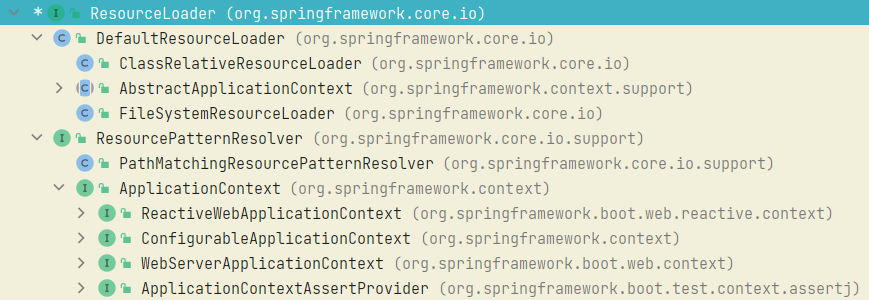
可以看到接口实现主要分两类,一类是 DefaultResourceLoader,我们就看 DefaultResourceLoader 怎么用,一类是 ResourcePatternResolver,我们看看 PathMatchingResourcePatternResolver 和 ApplicationContext 怎么用。
DefaultResourceLoader
DefaultResourceLoader 是 ResourceLoader 接口的默认实现。这也是我们在源码中,见到的最多的 ResourceLoader 实现类。
在 ResourceEditor 中有所使用,也是 org.springframework.context.support.AbstractApplicationContext 的父类。当然也可以单独使用。
如果资源位置是一个 URL,将返回一个 UrlResource,如果它是非 URL 路径或 classpath: 开头的 URL,则返回一个 ClassPathResource。
protocolResolvers 字段,是一个有序的 Set,表示协议解析链,用于在 getResource 中进行自定义的协议解析。元素类型为 ProtocolResolver。
ProtocolResolver是一个函数式接口,作用是对特定协议下的资源进行处理,我们可以通过在DefaultResourceLoader中注册ProtocolResolver来实现对自定义协议下的资源的处理。
private final Set<ProtocolResolver> protocolResolvers = new LinkedHashSet<>(4);
如果前面的
ProtocolResolver成功解析,则直接返回不再解析,所以协议解析链中的协议解析器的顺序很重要,具体的使用看实践小节
继续看 DefaultResourceLoader#getResource 方法,
资源位置的解析顺序是:
-
先进行协议解析链解析
-
然后进行类路径解析,在类路径中查找
-
最后再进行 URL 解析
-
如果都不是,还是默认进行类路径解析,在类路径中查找
前面的解析成功,就会直接返回,后面的步骤就不再执行
public Resource getResource(String location) {
    Assert.notNull(location, "Location must not be null");

    // 先通过协议解析链解析资源地址
    for (ProtocolResolver protocolResolver : getProtocolResolvers()) {
        Resource resource = protocolResolver.resolve(location, this);
        if (resource != null) {
            // 如果成功解析,则直接返回不再解析,所以协议解析链中的协议解析器的顺序很重要
            return resource;
        }
    }

    // 以/开头,最终还是返回 ClassPathResource
    if (location.startsWith("/")) {
        return getResourceByPath(location);
    }
    // 直接以 classpath: 开头的路径,最终返回 ClassPathResource
    else if (location.startsWith(CLASSPATH_URL_PREFIX)) {
        return new ClassPathResource(location.substring(CLASSPATH_URL_PREFIX.length()), getClassLoader());
    }
    else {
        try {
            // 尝试将资源地址转化为URL
            // Try to parse the location as a URL...
            URL url = new URL(location);
            // 如果成功将资源地址转化为URL,则进一步判断 是不是文件协议下的url,如果是,则返回FileUrlResource,不是,则返回 UrlResource
            return (ResourceUtils.isFileURL(url) ? new FileUrlResource(url) : new UrlResource(url));
        }
        catch (MalformedURLException ex) {
            // 如果无法将资源地址转化为URL,尝试在类路径下解析
            // No URL -> resolve as resource path.
            return getResourceByPath(location);
        }
    }
}
实践
public static void main(String[] args) {
    // 测试单独使用
    DefaultResourceLoader loader = new DefaultResourceLoader();
    loader.addProtocolResolver((location, resourceLoader) -> {
        // 当使用自定义协议的时候,是无法直接将url字符串转化为 URL对象的
        // 因为虽然可以获取协议名,但是URL.getURLStreamHandler 在根据协议名获取流处理器的时候返回结果为null,抛出异常 MalformedURLException
        URI uri = null;
        try {
            uri = ResourceUtils.toURI(location);
        } catch (URISyntaxException e) {
            throw new RuntimeException(e);
        }
        if (uri == null) {
            return null;
        }
        String protocol = uri.getScheme();
        if (protocol == null || !"ABC".equals(protocol.toUpperCase())) {
            return null;
        }
        // 开始处理 ABC 协议的资源路径
        // 将自定义协议转化为 http协议
        String newLocation = location.replaceAll("abc", "http");
        Resource resource;
        try {
            resource = new UrlResource(newLocation);
        } catch (MalformedURLException e) {
            throw new RuntimeException(e);
        }
        return resource;
    });
    // 获取自定义协议下的资源
    Resource myProtocolResource = loader.getResource("abc://www.baidu.com");
    boolean myProtocolResourceExist = myProtocolResource.exists();
    System.out.println("自定义协议资源是否存在:" + myProtocolResourceExist);
    // 获取类路径下的资源
    Resource classpathResource = loader.getResource("classpath:./application.properties");
    boolean classpathResourceExist = classpathResource.exists();
    System.out.println("类路径下的资源是否存在:" + classpathResourceExist);
    // 获取文件系统下的资源
    Resource fileResource = loader.getResource("file:./config.properties");
    boolean fileResourceExist = fileResource.exists();
    System.out.println("文件系统下的资源是否存在:" + fileResourceExist);
    // 获取类路径下的资源
    Resource onlyNameLocationResource = loader.getResource("application.properties");
    boolean onlyNameLocationResourceExist = onlyNameLocationResource.exists();
    System.out.println("不带任何协议头,则默认在类路径下查找,资源是否存在:" + onlyNameLocationResourceExist);
}
输出
自定义协议资源是否存在:true
类路径下的资源是否存在:true
文件系统下的资源是否存在:true
不带任何协议头,则默认在类路径下查找,资源是否存在:true
注意
当使用自定义协议的时候,是无法直接将 url 字符串转化为 URL 对象的,因为虽然可以获取协议名,但是 URL.getURLStreamHandler 在根据协议名获取流处理器的时候返回结果为 null,抛出异常 MalformedURLException
注意相对路径
FileUrlResource 的 exists 方法继承自 AbstractFileResolvingResource(具体细节看 AbstractFileResolvingResource 小节),最终会直接获取 URL 指向的 File 实例,通过检查这个 File 实例指向的文件是否物理存在来判断资源存不存在,如果资源路径是 file:./ 开头,这是一个相对路径,因为以相对路径创建 File 实例的时候相对路径的起点就是当前 MainClass 的工作目录,因此,这个相对路径最终会以 System.getProperty("user.dir") 返回的路径为相对路径的起点查找文件,
调用栈:

ResourceUtils#getFile 方法
public static File getFile(URL resourceUrl, String description) throws FileNotFoundException {
    Assert.notNull(resourceUrl, "Resource URL must not be null");
    if (!URL_PROTOCOL_FILE.equals(resourceUrl.getProtocol())) {
        throw new FileNotFoundException(
                description + " cannot be resolved to absolute file path " +
                "because it does not reside in the file system: " + resourceUrl);
    }
    try {
        // 最终还是通过 File 来获取文件
        // 如果路径为相对路径,File文件就会以 System.getProperty("user.dir") 为相对路径的起点查找文件
        return new File(toURI(resourceUrl).getSchemeSpecificPart());
    }
    catch (URISyntaxException ex) {
        // Fallback for URLs that are not valid URIs (should hardly ever happen).
        return new File(resourceUrl.getFile());
    }
}
File 实例的创建跟工作目录的关系,看《Java 中的常见路径和资源获取.md》
ResourcePatternResolver
继承 ResourceLoader 接口,增加了方法:
Resource[] getResources(String locationPattern) throws IOException;
在 ResourceLoader 的基础上更进一步,根据资源位置模板 (例如 ant 样式的路径模式) 解析出多个 Resource 对象。我们可以通过指定位置模板,一次性获取所有匹配路径模板的资源。
实现类:
ApplicationContext 实现了 ResourcePatternResolver,可在运行时通过 ResourceLoaderAware 获得。
PathMatchingResourcePatternResolver 是一个独立的实现,可在 ApplicationContext 之外使用,ResourceArrayPropertyEditor 也使用它来填充资源数组 bean 属性。
可以与任何类型的位置模板一起使用例如,/WEB-INF/*-context.xml。然而,输入的位置模版必须与 ResourcePatternResolver 的实现相匹配。ResourcePatternResolver 接口只是指定转换方法,而不是指定特定的模式格式。
PathMatchingResourcePatternResolver
实现 ResourcePatternResolver 接口,能够将指定的资源位置路径解析为一个或多个匹配的资源(Resource 对象)。资源位置路径可以是到目标资源的一对一映射的简单路径,也可以包含特殊的 classpath*: 前缀和/或内部 ant 风格的正则表达式 (使用 Spring 的 AntPathMatcher 工具进行匹配)。后两者都是有效的通配符。
AntPathMatcher的匹配规则,看《UrlPathHelper+PathMatcher 简单解析.md》
匹配方式(简单看看即可):
-
没有通配符:
在简单的情况下,如果指定的位置路径不以
classpath*:前缀开头,也不包含PathMatcher模式(比如AntPathMatcher),该解析器将通过底层ResourceLoader上的getResource()方法简单地返回单个资源。例如file:C:/context.xml,classpath:/context.xml,以及简单的无前缀路径,如/WEB-INF/context.xml。其中,/WEB-INF/context.xml的解析,将在ResourceLoader中以一种特定的方式解析,例如,用于WebApplicationContext的ServletContextResource。 -
Ant 风格的位置模板:
当路径位置包含 ant 风格的匹配模板时,例如
/WEB-INF/*-context.xml、com/mycompany/**/applicationContext.xml、file:C:/some/path/*-context.xml、classpath:com/mycompany/**/applicationContext.xml,此时,解析器遵循一个复杂但已定义好的过程来尝试解析通配符。首先,以最后一层不包含通配符的路径生成一个
Resource,即资源查找的根路径,并从中获取一个URL。如果此 URL 不是jar:或特定于容器的变体 (例如。WebLogic 中的zip:,WebSphere 中的wsjar等),那么从中获得java.io.File,并将之用于通过遍历文件系统解析通配符。在 URL 为jar:的情况下,解析器要么从中获取java.net.JarURLConnection,要么手动解析 jar 开头的 URL,然后遍历 jar 包中的内容,以解析通配符 -
classpath*为前缀的位置模板通过
classpath*:前缀,可实现同时出查询多个同名类路径资源。例如,classpath*:META-INF/beans.xml将在类路径中找到所有beans.xml文件,无论是在当前模块的编译输出路径<module_name>/target/classes目录(打成 jar 之后对应 jar 包中的 classes 目录)中还是在第三方 jar 包中。这对于自动扫描在每个 jar 包的相同位置的相同名称的配置文件特别有用。在内部,这是通过调用ClassLoader.getResources()实现的,并且是完全可移植的。ClassLoader.getResources()方法的实践,参考《Java 中的常见路径和资源获取.md》 -
同时包含
classpath*前缀和 Ant 风格通配符。classpath*:前缀还可以与位置路径的其余部分中的PathMatcher模式结合使用,例如classpath*:META-INF/*-beans.xml。在本例中,解析策略相当简单:在最后一个非通配符路径段上调用ClassLoader.getResources(),以获取类加载器层次结构中的所有匹配资源,然后在每个资源之上,对通配符所在的部分子路径使用上面Ant风格的位置模板描述的相同 PathMatcher 解析策略。注意 1:路径模板同时包含
classpath*前缀和 Ant 风格通配符的时候,通配符之前至少要有一个确定的根路径,即要有一个确定的资源查找的根路径,这样的才会同时返回当前模块的编译输出路径<module_name>/target/classes目录(打成 jar 之后对应 jar 包中的 classes 目录)和第三方 jar 包中的资源,否则只会返回当前模块的编译输出路径<module_name>/target/classes目录(打成 jar 之后对应 jar 包中的 classes 目录)中匹配的资源,比如classpath*:META-INF/*-beans.xml,确定的根路径就是META-INF,就会同时查找这两个中路径,"classpath*:*.xml,就只会查找当前模块的编译输出路径<module_name>/target/classes目录(打成 jar 之后对应 jar 包中的 classes 目录)中匹配的资源。注意 2:如果要搜索的根包在多个类路径位置可用,则不能保证带有
classpath:前缀的资源的 ant 样式模式能够找到匹配的资源。
接下来解析一下 PathMatchingResourcePatternResolver 的源码
主要有两个核心属性
// 本质上还是要委托给 resourceLoader 进行资源的查找,比如 getResource 方法就是委托给 resourceLoader 的 getResource方法
// 这个属性可以在构造函数中传入,也可以不传入,此时默认为 DefaultResourceLoader
private final ResourceLoader resourceLoader;
// 用于资源的路径匹配 具体用法看 看《UrlPathHelper+PathMatcher简单解析.md》
// 默认初始化为 AntPathMatcher,当然也可以通过 setPathMatcher方法进行更改,不过一般都不会修改,没有必要
private PathMatcher pathMatcher = new AntPathMatcher();
getResource 方法的实现实际上就是委托给 resourceLoader 属性,现在详细说说 getResources 方法的实现,看看是不是如上文注释所说。
@Override
public Resource[] getResources(String locationPattern) throws IOException {
    Assert.notNull(locationPattern, "Location pattern must not be null");

    // 以`classpath*:`打头
    if (locationPattern.startsWith(CLASSPATH_ALL_URL_PREFIX)) {
        // 把 CLASSPATH_ALL_URL_PREFIX 后面那部分截取出来,看看是否是模版(包含通配符,比如 * 和 ?  就是模版,否则不是)
        if (getPathMatcher().isPattern(locationPattern.substring(CLASSPATH_ALL_URL_PREFIX.length()))) {
            // a class path resource pattern
            // 是模板 ,那就交给这个方法,这个是个核心方法   这里传入的是locationPattern
            return findPathMatchingResources(locationPattern);
        }
        else {
            // all class path resources with the given name
            // 如果不是模板,那就完全匹配。去找所有的类路径中的资源,path匹配上就行
            return findAllClassPathResources(locationPattern.substring(CLASSPATH_ALL_URL_PREFIX.length()));
        }
    }

    // 不是以`classpath*:`打头的
    else {
        // 支持到tomcat的war:打头的方式
        // 注意,如果 locationPattern 不以任何协议开头(不包含 : ),就是一个常规的路径,比如config/aaa/bbb/*.txt,那么,此时的prefixEnd就是0,依然有效
        int prefixEnd = (locationPattern.startsWith("war:") ?  locationPattern.indexOf("*/") + 1 :
                locationPattern.indexOf(':') + 1);
        if (getPathMatcher().isPattern(locationPattern.substring(prefixEnd))) {
            return findPathMatchingResources(locationPattern);
        }

        // 如果啥都不打头,那就当作一个正常的处理,委托给ResourceLoader直接去处理
        else {
            // a single resource with the given name
            return new Resource[] {getResourceLoader().getResource(locationPattern)};
        }
    }
}

// 通过 ClassLoader 中查找所有的的路径匹配的资源,委托给 doFindAllClassPathResources
protected Resource[] findAllClassPathResources(String location) throws IOException {
    String path = location;
    if (path.startsWith("/")) {
        path = path.substring(1);
    }
    Set<Resource> result = doFindAllClassPathResources(path);
    if (logger.isTraceEnabled()) {
        logger.trace("Resolved classpath location [" + location + "] to resources " + result);
    }
    return result.toArray(new Resource[0]);
}

protected Set<Resource> doFindAllClassPathResources(String path) throws IOException {
    Set<Resource> result = new LinkedHashSet<>(16);
    ClassLoader cl = getClassLoader();
    // 直接委托给 ClassLoader 的 getResources 方法,返回 URL
    Enumeration<URL> resourceUrls = (cl != null ? cl.getResources(path) : ClassLoader.getSystemResources(path));
    // 依次遍历所有的 URL,构建成 UrlResource 添加到返回的Set中
    while (resourceUrls.hasMoreElements()) {
        URL url = resourceUrls.nextElement();
        // convertClassLoaderURL 实际上就是根据 URL构建了 UrlResource
        result.add(convertClassLoaderURL(url));
    }
    if (!StringUtils.hasLength(path)) {
        // The above result is likely to be incomplete, i.e. only containing file system references.
        // We need to have pointers to each of the jar files on the classpath as well...
        addAllClassLoaderJarRoots(cl, result);
    }
    return result;
}

// 根据Pattern去匹配资源,处理通配符的匹配
protected Resource[] findPathMatchingResources(String locationPattern) throws IOException {
    // 确定以locationPattern进行资源匹配时的根文件夹。
    // 比如locationPattern=classpath:META-INF/spring.factories  得到classpath*:META-INF/
    // 若是classpath*:META-INF/ABC/*.factories 得到的就是 classpath*:META-INF/ABC/
    // 简单的说,就是截取第一个不是patter的地方的前半部分
    String rootDirPath = determineRootDir(locationPattern);
    // 以locationPattern进行资源匹配时的根文件夹的后半部分,也就是包含通配符的部分,比如根据前面的例子就是:*.factories
    String subPattern = locationPattern.substring(rootDirPath.length());

    // 这个递归就厉害了,继续调用了getResources("classpath*:META-INF/")方法,因为其中包含通配符,所以会走 findAllClassPathResources方法,或者 getResourceLoader().getResource
    // 相当于把该文件夹匹配的所有的资源(注意:可能会比较多的),最后在和patter匹配即可
    // 比如此处:只要jar里面有META-INF目录的  都会被匹配进来
    Resource[] rootDirResources = getResources(rootDirPath);
    Set<Resource> result = new LinkedHashSet<>(16);
    // 遍历每一个根文件夹处理根文件夹下的资源
    for (Resource rootDirResource : rootDirResources) {
        // resolveRootDirResource是留给子类去复写的。但是Spring没有子类复写此方法,默认实现是啥都没做
        rootDirResource = resolveRootDirResource(rootDirResource);
        URL rootDirUrl = rootDirResource.getURL();

        // 这个if就一般不看了  是否为了做兼容
        if (equinoxResolveMethod != null && rootDirUrl.getProtocol().startsWith("bundle")) {
            URL resolvedUrl = (URL) ReflectionUtils.invokeMethod(equinoxResolveMethod, null, rootDirUrl);
            if (resolvedUrl != null) {
                rootDirUrl = resolvedUrl;
            }
            rootDirResource = new UrlResource(rootDirUrl);
        }


        // 支持vfs协议(JBoss)
        if (rootDirUrl.getProtocol().startsWith(ResourceUtils.URL_PROTOCOL_VFS)) {
            result.addAll(VfsResourceMatchingDelegate.findMatchingResources(rootDirUrl, subPattern, getPathMatcher()));
        }

        // 是否是jar文件或者是jar资源(显然大多数情况下都是此情况)
        else if (ResourceUtils.isJarURL(rootDirUrl) || isJarResource(rootDirResource)) {
            // 把rootDirUrl, subPattern都交给doFindPathMatchingJarResources去处理
            result.addAll(doFindPathMatchingJarResources(rootDirResource, rootDirUrl, subPattern));
        }

        // 不是Jar文件(那就是本工程里字的META-INF目录)
        // 那就没啥好说的,直接给个subPattern去匹配吧,一般都是进行文件资源的查找
        else {
            result.addAll(doFindPathMatchingFileResources(rootDirResource, subPattern));
        }
    }

    // 最终转换为数组返回。 注意此处的result是个set,是有去重的效果的
    return result.toArray(new Resource[0]);
}

// 确定资源匹配的根文件夹。
protected String determineRootDir(String location) {
    // 如果以协议开头,那就从协议后面开始算,如果不以协议开头,那就直接从0也就是第一个字符开始算
    int prefixEnd = location.indexOf(':') + 1;
    // rootDirEnd 一开始就是到 location 的末尾
    int rootDirEnd = location.length();
    // 不断从后往前缩短路径直到不包含通配符
    while (rootDirEnd > prefixEnd && getPathMatcher().isPattern(location.substring(prefixEnd, rootDirEnd))) {
        // 如果截取的字符串依然包含通配符,则从后往前缩短一层路径
        // PS :每层路径通过 / 隔开
        rootDirEnd = location.lastIndexOf('/', rootDirEnd - 2) + 1;
    }
    if (rootDirEnd == 0) {
        rootDirEnd = prefixEnd;
    }
    // 注意,是从0开始,而不是从 prefixEnd 开始,也就是(如果有的话)也会带上协议,比如file:、classpath:
    return location.substring(0, rootDirEnd);
}

protected Set<Resource> doFindPathMatchingJarResources(Resource rootDirResource, URL rootDirURL, String subPattern) {
    ...
    // 这个方法就源码不细说了,有点长
    //Find all resources in jar files that match the given location pattern
    // 就是去这个jar里面去找所有的资源(默认利用Ant风格匹配)
    //此处用到了`java.util.jar.JarFile`、`ZipFile`、`java.net.JarURLConnection`等等
    // 路径匹配:getPathMatcher().match(subPattern, relativePath) 使用的此方法去校对
}

// Find all resources in the file system that match the given location pattern
// 简单的说,这个就是在我们自己的当前的文件系统里找
protected Set<Resource> doFindPathMatchingFileResources(Resource rootDirResource, String subPattern)
        throws IOException {

    // rootDir:最终是个绝对的路径地址,带盘符的。来代表META-INF这个文件夹
    File rootDir;
    try {
        rootDir = rootDirResource.getFile().getAbsoluteFile();
    } catch (IOException ex) {
        return Collections.emptySet();
    }
    // FileSystem  最终是根据此绝对路径 去文件系统里找
    return doFindMatchingFileSystemResources(rootDir, subPattern);
}

// 这个比较简单:就是把该文件夹所有的文件都拿出来dir.listFiles(),然后一个个去匹配
// 备注:子类`ServletContextResourcePatternResolver`复写了此方法~
protected Set<Resource> doFindMatchingFileSystemResources(File rootDir, String subPattern) throws IOException {
    if (logger.isDebugEnabled()) {
        logger.debug("Looking for matching resources in directory tree [" + rootDir.getPath() + "]");
    }
    // 遍历根目录下的文件,和subPattern进行一一匹配
    Set<File> matchingFiles = retrieveMatchingFiles(rootDir, subPattern);
    Set<Resource> result = new LinkedHashSet<>(matchingFiles.size());
    for (File file : matchingFiles) {]
        // 最终用FileSystemResource把File包装成一个Resource
        result.add(new FileSystemResource(file));
    }
    return result;
}
简单分析一下过程,其实主要就分四种情况
-
以
classpath*开头-
后面的路径包含通配符,调用
findPathMatchingResources -
不包含通配符,直接把
classpath*后面的路径通过ClassLoader.getResources查找所有的资源。ClassLoader.getResources()方法的实践,参考《Java 中的常见路径和资源获取.md》
-
-
不以
classpath*开头-
路径包含通配符,调用
findPathMatchingResources -
路径不包含通配符,直接通过
ResourceLoader.getResource方法当作确定路径查找资源
-
现在来看看 findPathMatchingResources 的逻辑
-
首先获取资源查找路径的根路径(根路径不包含通配符,所以根路径实际上是固定路径)
-
然后获取资源查找路径中,根路径后面的带通配符的路径
-
查找所有根路径对应的资源
-
遍历每一个根路径,获取根路径下的所有资源(根据资源类型分情况)跟带通配符的路径进行匹配,匹配上的资源最终返回
实践
public static void main(String[] args) throws IOException {
    ResourceLoader resourceLoader = new DefaultResourceLoader();
    Resource resource = resourceLoader.getResource("classpath:META-INF/spring.factories");
    // 理论上应该是哟很多个的,但是这里只找到一个。
    // jar:file:/D:/Program-Dev/m2/repository_nexus_local/org/springframework/boot/spring-boot/2.7.5/spring-boot-2.7.5.jar!/META-INF/spring.factories
    System.out.println("----------------------------------- ResourceLoader -----------------------------------");
    System.out.println(resource.getURL());
    System.out.println(resource.exists());

    System.out.println("----------------------------------- ResourcePatternResolver -----------------------------------");
    PathMatchingResourcePatternResolver resourcePatternResolver = new PathMatchingResourcePatternResolver();
    // classpath:META-INF/spring.factories 表示只用找在一个jar包中找,找到即可返回,所以结果使一个
    // classpath*:META-INF/spring.factories 表示去所有的类路径下找,包括当前模块的编译输出路径和引用的jar包
    Resource[] resources0 = resourcePatternResolver.getResources("classpath:META-INF/spring.factories");
    System.out.println("start with classpath:"+resources0.length);
    Resource[] resources1 = resourcePatternResolver.getResources("classpath*:META-INF/spring.factories");
    System.out.println("start with classpath*:"+resources1.length);

    // 还能使用Ant风格进行匹配  太强大了:
    // 查看类路径下所有的`META-INF/*.factories` 能匹配上的所有文件
    Resource[] resources = resourcePatternResolver.getResources("classpath*:META-INF/*.factories");
    System.out.println("classpath* plus ant-style path: "+resources.length);
    // 查看类路径下指定包下的所有class类,比如我的
    Resource[] resourcesAll = resourcePatternResolver.getResources("classpath*:xyz/xiashuo/**/*.class");
    System.out.println("classpath* plus ant-style path: "+resourcesAll.length);

    System.out.println("----------------------------------- ResourcePatternResolver for fileSystem resource -----------------------------------");
    // 也就是说,之前在 ResourceLoader.getResource方法中使用的路径,加上通配符就能在 ResourcePatternResolver.getResources 中使用,相当方便
    Resource[] fileResources = resourcePatternResolver.getResources("file:./doc/*");
    System.out.println("classpath* plus ant-style path: "+fileResources.length);
    for (Resource fileResource : fileResources) {
        boolean isFile = fileResource.isFile();
        if (isFile) {
            File file = fileResource.getFile();
            System.out.println(file.getPath());
        }
    }
}
总结
实际上我们使用 PathMatchingResourcePatternResolver 也就四种情况
-
file:开头,搭配包含通配符的路径,在本机文件系统中查找,可使用绝对路径和相对路径,相对路径基于当前程序的工作目录。 -
classpath:开头,搭配包含通配符的路径,在类路径下查找,包含当前模块的编译输出路径和引入的第三方 jar 包,但是只会返回一个匹配的根路径下的结果 -
classpath*:开头,搭配包含通配符的路径,在类路径下查找,包含当前模块的编译输出路径和引入的第三方 jar 包,会返回多个匹配的根路径下的结果 -
web 应用根目录,例如
WEB-INF/下的资源。
ApplicationContext - 重点
ApplicationContext 继承了 ResourcePatternResolver 接口,可直接使用 getResource 和 getResources 方法,非常方便。
Spring Bean 可以通过实现 ResourceLoaderAware 获取一个全局的 ResourceLoader(实际上就是 ApplicationContext 自身),然后可以非常方便地查询资源。非常的简单。
实践
public static void main7(String[] args) throws IOException {
    // 直接用 ConfigurableApplicationContext 效果是一样的。方便了,终于知道为什么要在 ApplicationContext 上实现那么多东西了,都是为了方便
    ConfigurableApplicationContext context = SpringApplication.run(ResourceApplication.class, args);
    Resource resource = context.getResource("classpath:META-INF/spring.factories");

    Resource[] resources0 = context.getResources("classpath:META-INF/spring.factories");
    System.out.println("start with classpath:"+resources0.length);
    Resource[] resources1 = context.getResources("classpath*:META-INF/spring.factories");
    System.out.println("start with classpath*:"+resources1.length);

    //
    //context.getResource();
    Resource[] resources = context.getResources("classpath*:META-INF/*.factories");
    System.out.println("classpath* plus ant-style path: "+resources.length);
    // 查看类路径下指定包下的所有class类,比如我的
    Resource[] resourcesAll = context.getResources("classpath*:xyz/xiashuo/**/*.class");
    System.out.println("classpath* plus ant-style path: "+resourcesAll.length);
    //context.getResources()
    Resource[] fileResources = context.getResources("file:./doc/*");
    System.out.println("classpath* plus ant-style path: "+fileResources.length);
    for (Resource fileResource : fileResources) {
        boolean isFile = fileResource.isFile();
        if (isFile) {
            File file = fileResource.getFile();
            System.out.println(file.getPath());
        }
    }
}
输出
start with classpath:1
start with classpath*:3
classpath* plus ant-style path: 3
classpath* plus ant-style path: 1
classpath* plus ant-style path: 3
E:\IDEAProject\Spring5Framework\Resource\.\doc\aaa.txt
E:\IDEAProject\Spring5Framework\Resource\.\doc\bbb.txt
E:\IDEAProject\Spring5Framework\Resource\.\doc\ccc.txt
总结
最开始的时候,我们要获取资源,要么手动通过创建 File 实例来获取资源,要么只能通过 Class 实例或者 ClassLoader 的 getResource 或 getResources 方法,如果是互联网资源,就得手动创建 URL 实例。
参考《Java 中的常见路径和资源获取.md》
然后 Spring 开始从中抽象出一个顶级接口 Resource,同时将我们之前的各种资源都包装成 Resource 的一个实现类,包括 File、ClassPath、URL 等,这样资源的管理就开始变得统一起来,然后,Spring 还提供了 ResourceLoader 资源加载器,有了资源加载器,程序员可以完全不用关心底层返回的是哪一种类型的 Resource 的实现,只要传入正确的资源路径,即可获取 Resource 资源,极大的简化了资源的获取操作,而且为了一次性获取多个资源,ResourcePatternResolver 还在 ResourceLoader 的基础上进行了拓展,让其可以通过在资源位置中使用 classpath*: 前缀搭配通配符一次性获取多个资源,而随处可见的应用上下文 ApplicationContext 就实现了 ResourcePatternResolver,因此,通过 ApplicationContext 的 getResource 和 getResources 方法,我们就能非常方便地获取资源了。